Inbound Routing
Introduction
Routing can be used to change the behavior of the Contact Center when a certain address / URI is recognized. For each line in the Routing a Match criteria can be set, following the order the Match lines will be used. When there is a match the address will be forwarded to either the Skill or the Parent Question. When forwarded to a Skill the caller will directly enter the queue. When forward to a Parent Question, the customer will enter the Interactive Voice Response, or IVR, is a telephone application to take orders via telephone keypad or voice through a computer. By choosing menu options the caller receives information, without the intervention of a human operator, or will be forwarded to the appropriate Agent. at that point.
Inbound / Direct Routing, also known as C-Level Routing, is when an Agent is called directly.
For Inbound / Direct Routing both the MatchTo and MatchFrom fields will be used. This routing is only active when the address / URI in MatchTo is being called.
Preparation
Note
Only Available with Dialogue Cloud in combination with Direct Routing. This requires that all phone numbers, assigned to Agents that need to be inbound intercepted, are forwarded to AnywhereNow.
-
Navigate to the SharePoint Configuration Page of the A Unified Contact Center, or UCC, is a queue of interactions (voice, email, IM, etc.) that are handled by Agents. Each UCC has its own settings, IVR menus and Agents. Agents can belong to one or several UCCs and can have multiple skills (competencies). A UCC can be visualized as a contact center “micro service”. Customers can utilize one UCC (e.g. a global helpdesk), a few UCC’s (e.g. for each department or regional office) or hundreds of UCC’s (e.g. for each bed at a hospital). They are interconnected and can all be managed from one central location.
- Configure the setting to enable the routing
- Open the Settings List
- Add new Item for Inbound Interception
- Key =
UseInboundAudioRecording - Value = true
- Key =
- Add one or more Agents, with a Teams Assigned Phone Number, in your UCC. This ensures that the Inbound Routing rules are checked, when a phone call comes in on any of these phone numbers.
- Open the Agent list
- Add new item
- Agent = sip:[unique name]@[customer sipdomain]
- Formal = False
- TeamsAssignedPhoneNumber = The phonenumber assigned to the Direct Routing Endpoint
Note
Provided by your AnywhereNow contact.
Useful Matches
Match All
.
Match All except +31
(?s)^((?!\+31).)*$
Match Multiple
406|407
Scenarios
Boss secretary routing
Instead of using the Microsoft Teams "Delegates" feature. Use Inbound Routing, this way you have much more flexibility to route customers to the right contact in your organization, and benefit from features like reporting and audio recording. Furthermore, you have much more control, as Agents cannot influence the behavior by changing personal settings on their client.
Support redirect
When users should be called directly, you can use the Inbound Routing rules to redirect these calls to a Skill.
Explanation per field
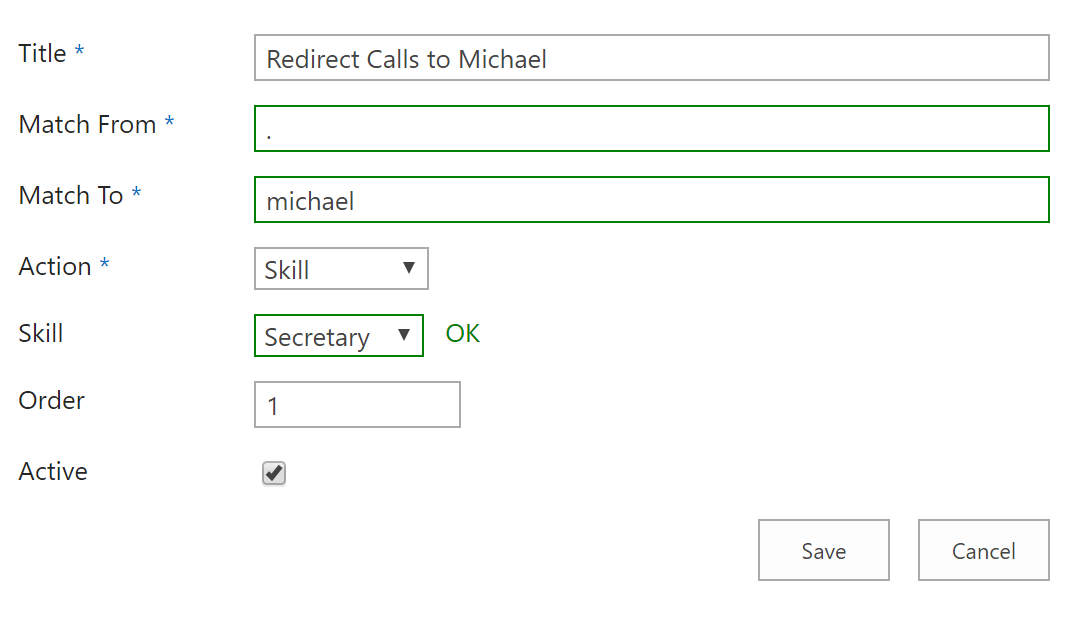
In order to manage Inbound Routing, the following screen should be filled in:
| Item | Description |
|---|---|
| Title |
Can be used for note. |
| MatchFrom |
The value that will be searched for in the address of the Caller. Note The field will be used as a regular expression |
| MatchTo |
The value that will be search in the address of the receiver (For example, all or part of the Agent Sip Address) |
| Action |
The action that will be done when a match is found. |
| Skill |
The Skill that will be used for that action. (Only for action Skill or CallBack, an IVR menu feature for voice, enables the customer to confirm or leave an alternative phone number to be called back by an available agent during business hours.) |
| ParentQuestion |
The IVR Question to where the caller will be forwarded, if there is match. (Only for action Question) Note IVR Question must be a Question or Welcome Message |
| Order |
The order the rules of the Routing will be executed. |
| ReferredBy Callee |
this option defines whether or not the transferred by header should show the The Session Initiation Protocol, or SIP, is a protocol for multimedia communication (audio, video and data communication). SIP is also used for Voice over IP (VoIP). SIP has interactions with other Internet protocols such as HTTP and SMTP. Address of the intercepted Agent. |
| Active |
Check to make Routing active. |
Create/Edit/Remove item
Item can be created, edited or removed.
Warning
Updates to the system take place in real-time. Entering the incorrect information here may cause issues with your software. Proceed with caution.
Create Item
- Open the list.
- Select the Add new item button.
- Enter the correct data in the window that appears.
- Select the Save button.
Edit Item
- Open the list.
- Tick the respective item.
- Select the “Edit Properties” button.
- Enter the correct data in the window that appears.
- Select the “Save” button.
Remove Item
- Open the list.
- Tick the respective item
- Select the “Delete Item” button.