Holidays
Purpose
A holiday is a selected date and time period when a A Unified Contact Center, or UCC, is a queue of interactions (voice, email, IM, etc.) that are handled by Agents. Each UCC has its own settings, IVR menus and Agents. Agents can belong to one or several UCCs and can have multiple skills (competencies). A UCC can be visualized as a contact center “micro service”. Customers can utilize one UCC (e.g. a global helpdesk), a few UCC’s (e.g. for each department or regional office) or hundreds of UCC’s (e.g. for each bed at a hospital). They are interconnected and can all be managed from one central location. is closed. The UCC Business Hours will be overruled.
With the AnywhereNow platform it is required to configure Holidays for each individual UCC.
-
For audio sessions, during Holidays, an alternative message (IVRHolidayQuestionItem) will be played and customers can optionally be given the opportunity to leave a voice mail or limited routing options for further processing.
-
For text sessions, during Holidays, incoming messages will be stored and further processed only when the holiday ends and the next UCC Business Hours opening time is reached.
Relationship to Dialogue Studio
These are UCC-level closures. For normal incoming voice calls, a UCC holiday closure is handled before Dialogue Studio starts. The Holidays node evaluates messages within the flow and does not replace or disable the UCC's SharePoint Holidays.
Connect: A side-entry endpoint with Always open enabled can bypass UCC Business Hours and Holidays for incoming voice calls. This endpoint setting does not override TemporarilyClosed or overflow checks. Other routing and flow-entry conditions still apply. Configured outside-hours routing can provide separate exceptions.
Unify: The endpoint's Always open setting does not bypass the UCC opening-hours check for incoming voice calls. If the UCC is closed, it plays the configured closed message and ends the call before starting Dialogue Studio. Do not rely on this setting to send calls into the flow outside UCC opening hours.
Training Video
Explanation per field
In order to manage Holidays, the following screen should be filled in:
| Item | Description |
|---|---|
| Holiday |
This field contains the name of the Holiday. |
| Start datetime |
This field contains the start datetime of the holiday. This can be done with either the calendar function or by typing the date manual (DD/MM/YYYY) and selecting the timestamp. |
| End datetime |
This field contains the end datetime of the holiday. This can be done with either the calendar function or by typing the date manual (DD/MM/YYYY) and selecting the timestamp. |
| IVRQuestion |
This field contains alternative Interactive Voice Response, or IVR, is a telephone application to take orders via telephone keypad or voice through a computer. By choosing menu options the caller receives information, without the intervention of a human operator, or will be forwarded to the appropriate Agent. Question (IVRHolidayQuestionItem) that should play during the holiday. If empty the Message Closed will be used. |
(Optional) Create alternative IVR Question
-
Open the IVR List
-
Open the tab "Items"
-
Select the dropdown for "New Item"
-
Select "IVRHolidayQuestion" Item
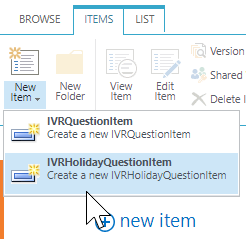
-
Fill in the field as a normal IVR Question. Learn More
Create/Edit/Remove item
Item can be created, edited or removed.
Warning
Updates to the system take place in real-time. Entering the incorrect information here may cause issues with your software. Proceed with caution.
Create Item
- Open the list.
- Select the Add new item button.
- Enter the correct data in the window that appears.
- Select the Save button.
Edit Item
- Open the list.
- Tick the respective item.
- Select the “Edit Properties” button.
- Enter the correct data in the window that appears.
- Select the “Save” button.
Remove Item
- Open the list.
- Tick the respective item
- Select the “Delete Item” button.