Update UCC Creator
Tip
The Dialogue Cloud side A bundle is a fixed combination of our software platform elements of very specific versions. These are designed and tested to optimally work together to assure their intended function and interoperability. software is backward compatible with older versions of Ucc.Creator in your tenant (unless specifically mentioned in Bundle Release Notes). Dialogue Cloud A Unified Contact Center, or UCC, is a queue of interactions (voice, email, IM, etc.) that are handled by Agents. Each UCC has its own settings, IVR menus and Agents. Agents can belong to one or several UCCs and can have multiple skills (competencies). A UCC can be visualized as a contact center “micro service”. Customers can utilize one UCC (e.g. a global helpdesk), a few UCC’s (e.g. for each department or regional office) or hundreds of UCC’s (e.g. for each bed at a hospital). They are interconnected and can all be managed from one central location.'s should always be updated before updating Ucc.Creator sites.
Important
Updating a Ucc.Creator SharePoint site may take 15 minutes or more (30 minutes has also been reported) per UCC! The speed is dependent on update allowance of SharePoint in Microsoft 365 and cannot be influenced.
When using the Available since UCC.Creator v8.2.0.7. The model (preferred by Microsoft) in SharePoint on Microsoft 365 where no subsites are allowed. In this model each UCC will need its own separate SharePoint site (formerly known as site collection). This does allows for more granular user access and template updates per UCC. model this can be planned more efficiently. When using the Legacy (subsite) Ucc.Creator model sufficient time should be allotted for all UCC subsites to get updated sequentially during this upgrade process (e.g. updating 25 UCC (sub)sites could take up to 12,5 hours!).
Creating new OneUCC sites with the latest template, migrating settings and the UCC to this new site one UCC at a time is the only way to upgrade multiple UCC's over a longer but more controlled time period.
Update
Using ucc.update from version of ucc.creator 8.2.0.4 or lower
-
Unpack UCC.Creator.v8.0.xxxxx.x.zip
-
Navigate to folder UCC.Creator
-
Make sure you have filled configuration.xml with the proper settings
-
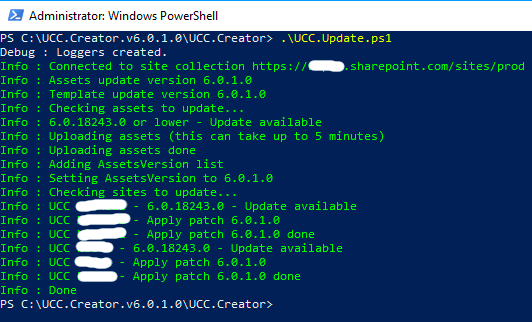
Open the regular PowerShell command window and run UCC.Update.ps1
As you can see the sites are updated:
Using Ucc.Update script from UCC.Creator 8.2.0.7 or higher with subsites disabled (SharePoint Online only, OneUCC model)
Warning
UCC.Creator 8.2.0.7 and higher uses the latest PnP Powershell instead of SPO Management Shell used in earlier versions of UCC.Creator. Please check your installed PowerShell versions (both Windows PowerShell and PowerShell 7.x are supported) and latest Microsoft or PowerShell 7.x updates if faced with issues running the scripts.
-
Unpack UCC.Creator.v8.x.x.x.zip
-
Navigate to folder UCC.Creator
-
Make sure you have filled configuration.xml with the proper settings of the UCC site.
-
Open the regular PowerShell command window and run "UCC.Update.ps1"
-
Repeat step 3 and 4 for every UCC site which needs updating.
Using Ucc.Update script from Ucc.Creator 8.2.0.7 or higher with subsites enabled (SharePoint Online only, Legacy model)
Warning
UCC.Creator 8.2.0.7 and higher uses the latest PnP Powershell instead of SPO Management Shell used in earlier versions of UCC.Creator. Please check your installed PowerShell versions (both Windows PowerShell and PowerShell 7.x are supported) and latest Microsoft or PowerShell 7.x updates if faced with issues running the scripts.
-
Unpack UCC.Creator.v8.0.xxxxx.x.zip
-
Navigate to folder UCC.Creator
-
Make sure you have filled configuration.xml with the proper settings
-
Open the regular PowerShell command window and run "UCC.Update.ps1 -useSubsites"