Configure WebAgent in Bullhorn
Before continuing, complete the prerequisites in Prerequisites.
Add 'WebAgent' to the Bullhorn 'Company Actions' dropdown list
To add the WebAgent to any company’s Actions dropdown list, follow these instructions:
-
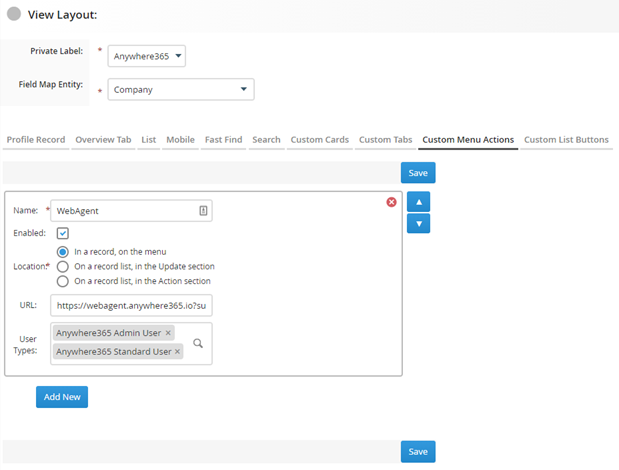
In the Menu, go to 'Admin' > ‘View Layout’
-
Choose ‘Company’ in the Field Map Entity dropdown
-
Go to tab ‘Custom Menu Actions’
-
Click the ‘Add New’ button
-
Enter the following values:
-
Name: WebAgent
-
Enabled: yes (ticked checkbox)
-
Location: In a record, on the menu
-
URL*: https://webagent.anywhere365.io?subdomain=[Subdomain]&clientid=[Clientid]&clientsecret=[Clientsecret]
* Use the WebAgent URL for your connect model.
Dialogue Cloud Neo (Connect)
Global:
https://webagent.anywhere365.io
NORA
https://nora-cus-webagent.anywhere365.io
https://nora-cus-2-webagent.anywhere365.io
https://nora-cus-3-webagent.anywhere365.io
EMEA
https://emea-weu-webagent.anywhere365.io
https://emea-weu-2-webagent.anywhere365.io
https://emea-weu-3-webagent.anywhere365.io
APAC
https://apac-eas-webagent.anywhere365.io
https://apac-eas-2-webagent.anywhere365.io
https://apac-eas-3-webagent.anywhere365.io
Dialogue Cloud Neo (Unify)
EMEA
https://app.emea.anywhere.now/login
APAC
https://app.apac.anywhere.now/login
NORA
-
Subdomain: replace [subdomain] with the cluster subdomain of your Bullhorn instance, e.g. ‘cls91’. Where can I find my cluster domain?
-
Clientid and Clientsecret: replace [Clientid] and [Clientsecret] with the clientid and cliensecret of your Bullhorn REST API. The Clientid and Clientsecret can be obtained by creating a support ticket via the Bullhorn Resource Center. If these values ever change for whatever reason, the url must be updated accordingly.
-
User Types: the user roles which are allowed to use the WebAgent
-
Register redirect url
In order for the WebAgent to be able to obtain a token for the Bullhorn REST API, the WebAgent url has to be registered by Bullhorn. This can be done by submitting a Bullhorn support ticket providing the request to update the redirect url.
Url: https://webagent.anywhere365.io for Dialogue Cloud Neo (Connect), or the Dialogue Cloud Neo (Unify) WebAgent URL for your region.
Note
Use the WebAgent URL for your connect model.
Warning
If this redirect url changes (for example when switching to regional WebAgent), it must be updated again by Bullhorn support via a support ticket.