Routing node - Holidays

A Unified Contact Center, or UCC, is a queue of interactions (voice, email, IM, etc.) that are handled by Agents. Each UCC has its own settings, IVR menus and Agents. Agents can belong to one or several UCCs and can have multiple skills (competencies). A UCC can be visualized as a contact center “micro service”. Customers can utilize one UCC (e.g. a global helpdesk), a few UCC’s (e.g. for each department or regional office) or hundreds of UCC’s (e.g. for each bed at a hospital). They are interconnected and can all be managed from one central location. opening hours and flow routing
The Business Hours and Holidays nodes evaluate messages within a Dialogue Studio flow. They do not replace or disable the UCC's Business Hours or Holidays configured in SharePoint.
For normal incoming voice calls, the UCC checks its opening state before starting the flow. When the UCC is closed, the call follows UCC closed-state handling instead of reaching the flow. An in-flow node cannot override this check.
Connect: A side-entry endpoint with Always open enabled can bypass UCC Business Hours and Holidays for incoming voice calls. This endpoint setting does not override TemporarilyClosed or overflow checks. Other routing and flow-entry conditions still apply. Configured outside-hours routing can provide separate exceptions.
Unify: The endpoint's Always open setting does not bypass the UCC opening-hours check for incoming voice calls. If the UCC is closed, it plays the configured closed message and ends the call before starting Dialogue Studio. Do not rely on this setting to send calls into the flow outside UCC opening hours.
Introduction
|
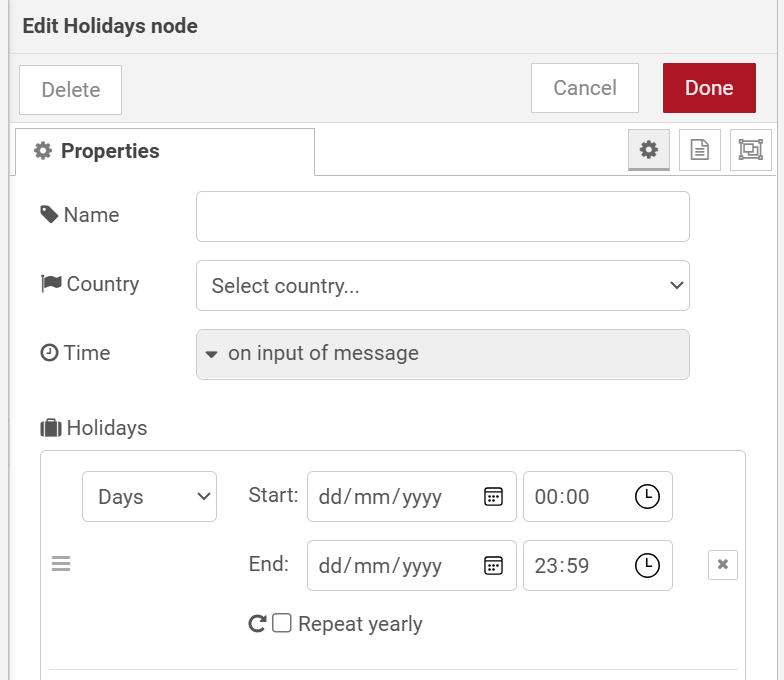
The Holidays node routes messages based on whether the current date matches a configured holiday or date range. Each configured rule produces a separate output port. When no rule matches, the message is always routed to the first output (no match). |
Note
The first output port is always the no match port. Each holiday rule added to the list generates an additional output port below it.
Configuration
| Setting | Description |
|---|---|
| Country | Select the country for holiday lookups. This determines which public holidays are available and drives the State/Region and Timezone dropdowns. |
| State | Optionally narrow the holiday calendar to a specific state or province within the selected country. Only shown when states are available for the chosen country. |
| Region | Optionally narrow the holiday calendar further to a specific region within the selected state. Only shown when regions are available. |
| Timezone | Determined automatically by the selected country/state/region. When multiple timezones exist for the selection, choose the appropriate one from the dropdown. Only shown when a country has been selected. |
| Time | The reference time used for evaluating rules. By default the message timestamp is used (on input of message). You can also select a time value from a message property or from flow/global context. |
| Holidays |
The list of rules for this node. Each rule can be one of the following types:
Each rule generates a corresponding output port on the node. Rules are evaluated from top to bottom. Use the drag handles to reorder them. |
| Stop on first match | When enabled, only the first matching rule produces output and evaluation stops. When disabled, the message is forwarded to every rule that matches, potentially producing output on multiple ports simultaneously. |
Validation
For Days rules, the end date/time must be strictly after the start date/time. For Holidays rules, the end time must be after the start time. Invalid rules are highlighted in the editor and will block deployment until corrected.
Output
The node always has at least one output:
- Port 1 (no match) — The incoming message is forwarded here when no rule matches the current date.
- Port 2 onward (per rule) — One port per configured holiday rule. When a rule matches, the message is routed to that rule's port. If Stop on first match is disabled and multiple rules match, independent copies of the message are sent to each matching port.
Note
A Country must be selected before Holidays-type rules can look up holiday names and types.