Wallboard View 6 (Reason Code Rows)
Introduction
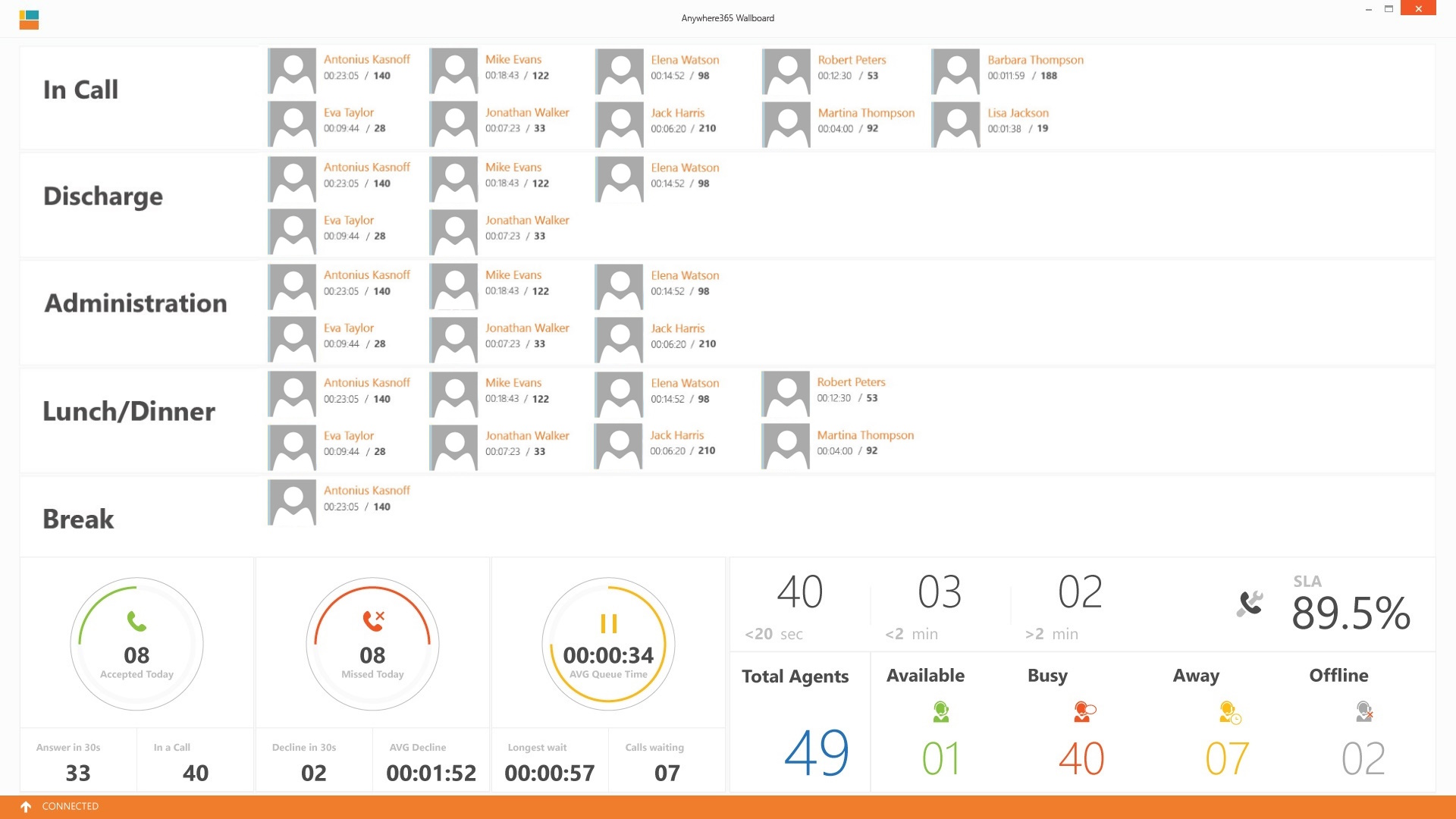
The Reason Code view gives the supervisor the overview in which reason codes their Agents are currently in.
Reason Code rows
Description
Each row is a reason code.
Explanation
Tip
First row can be configured as "InCall" status.
Tip
Second row can be configured as "Discharge".
Per Agent you can see how long this user has this status (hh:mm:ss) and an additional value (configurable). This can be:
-
Their Average Handling Time (Talk Time + Discharge Duration) is.
-
Their total number of calls today.
Agent overview
Description
Shows real-time the number of the number of agents.

Explanation
| Item | Description |
|---|---|
| Total Agents |
All When you create an 'Informal Agent' in the agent list, then this agent will be part of the agent circle as soon as he signs in to his Skype for Business or Teams client. In contrast, by marking the checkbox 'Formal' upon creating a new agent, the agent first has to actively sign in to the UCC to be available for call distribution. + All logged in A Formal Agent is able to sign in and sign out of the UCC. This can be achieved when the Agent sends a start or stop command to the Skype for Business client of the UCC. |
| Available |
Contains
|
| Busy |
Contains
|
| Away |
Contains
|
| Offline |
Contains
|
Call history overview
Description
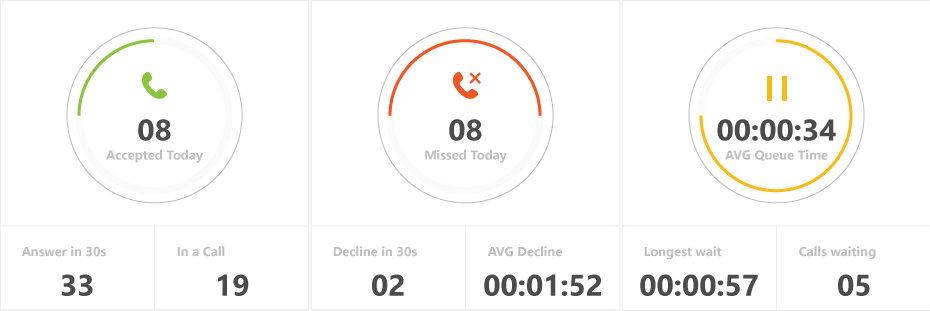
Show the daily call statistics.
Explanation
| Item | Description |
|---|---|
| Green circle |
Number of accepted conversations today |
| Answer in 30s |
Number of accepted conversations today with a queue time shorter than 30 seconds |
| In a Call |
Number of active accepted conversations |
| Red circle |
Number of missed conversations today (with a Skill) |
| Decline in 30s |
Number of missed conversations today with a queue time shorter than 30 seconds |
| AVG Decline |
The average number of seconds the conversations was disconnected today |
| Yellow circle |
Average queue time of the accepted conversations |
| Longest wait |
Longest Queue time of the accepted conversations today |
| Calls waiting |
Number of active conversations in the queue |
Note
All numbers include the Inbound, Outbound and Direct Conversations
SLA
Note
All numbers include the Inbound, Outbound and Direct Conversations. (Also forwarded calls are counted)
Description
Shows the SLA of the A Unified Contact Center, or UCC, is a queue of interactions (voice, email, IM, etc.) that are handled by Agents. Each UCC has its own settings, IVR menus and Agents. Agents can belong to one or several UCCs and can have multiple skills (competencies). A UCC can be visualized as a contact center “micro service”. Customers can utilize one UCC (e.g. a global helpdesk), a few UCC’s (e.g. for each department or regional office) or hundreds of UCC’s (e.g. for each bed at a hospital). They are interconnected and can all be managed from one central location. today.

Explanation
| Item | Description |
|---|---|
| <20 sec |
Number of accepted conversations today with a queue time shorter than 20 sec |
| < 2 min |
Number of accepted conversations today with a queue time shorter than 2 minutes |
| > 2 min |
Number of accepted conversations today with a queue time longer than 2 minutes |
| SLA |
[Accepted within < x sec]/ ([Accepted Today]+[Missed Today]) Note X seconds can be changed in the config.xml. |
Note
The Wallboard uses a simplified source for the statistics compared to the SQL Call Detail Records (CDR) are the meta data of a converstation: who talked to whom, at which time, for how long and with which identity among other things (skill, optional classification, etc) which gets stored in your SQL (analytical) database. Database based Power BI reports.
For this reason the data will not always be one-on-one the same.
Differences:
- Dialogue Intelligence distinguishes between Missed and QuickDrop, Wallboard combines them as Missed.
- Dialogue Intelligence distinguishes between Inbound, Direct, Outbound, Wallboard combines them.
- Dialogue Intelligence distinguishes between Hunts and Forwards, Wallboard combines them.