Release Notes - Feature release DC2024.01
Announcement
DC2024.01 has been made available in a Phased Roll-out to selected customers from April 2nd, 2024, with an expected General Availability (GA) no sooner then April 14th, 2024.
Update 11-04-2024: This A bundle is a fixed combination of our software platform elements of very specific versions. These are designed and tested to optimally work together to assure their intended function and interoperability. will not be made available as GA due to several identified issues. Solutions have been addressed in the first upcoming hotfix DC2024.01a.
Important
When upgrading from an older bundle, be sure to check out the What's New page for a concise list of all new features, behavioral changes and important updates you need to consider or execute, before upgrading!
This document contains a list of the updates and current versions of AnywhereNow software and components.
Client Components
Note
To streamline our support process, before raising a support ticket you need to ensure that the client used is upgraded to the version of the bundle and so the log provided with the ticket is inline with the Bundle. Please note that we will be unable to process support tickets raised on unsupported version.
| Component | Version | Remark |
|---|---|---|
| Ucc.Creator scripts (SharePoint template) | 8.2.0.7 | |
| Power BI template (for Power BI Desktop) |
8.8.23482.01 |
(Minimum required version for this bundle) |
| Inflight Wallboard (desktop client) | 6.5.7 | |
| Snapper (desktop client) |
8.7.4 |
(Minimum required version for this bundle) |
Special mention-related settings changes
Translation Settings Relocation
We have streamlined the translation service by integrating it directly into the A Unified Contact Center, or UCC, is a queue of interactions (voice, email, IM, etc.) that are handled by Agents. Each UCC has its own settings, IVR menus and Agents. Agents can belong to one or several UCCs and can have multiple skills (competencies). A UCC can be visualized as a contact center “micro service”. Customers can utilize one UCC (e.g. a global helpdesk), a few UCC’s (e.g. for each department or regional office) or hundreds of UCC’s (e.g. for each bed at a hospital). They are interconnected and can all be managed from one central location. Service and extending it with Microsoft AI Translation. As a result, the translation settings have been moved from the Plugin Settings to the UCC Settings. This change eliminates the need for a specific plugin to load the translation service.
For more details, please refer to Configure UCC translation
New features
| PBI | Description |
|---|---|
| 93089 |
Customizable Wrap-Up Time Increase Interval for WebAgent. A supervisor (or UCC administrator) can now add a new setting (DischargeDurationInterval)to the UCC settings list to define the time increase interval (previously fixed at 10 seconds). |
| 81478, 99902 |
Set Teams Presence to Busy when in Wrap-Up. When and agent is in Wrap-up (Discharge) state, the Teams Presence will now also be changed to Busy to reflect to Teams (other Teams users) or other (UCC) services connected to Teams that the agent is in this special activity state. A prerequisite is that the Graph Presence Publisher is enabled. |
| 83501, 99745, 101609, 101871, 101872, 101874, 101875 |
Provide audio indication to agent when supervisor joins/leaves the call. When a supervisor joins or leaves a call with an agent an audio tone is played to the agent to indicate that a new participant (i.e. supervisor) is joining or leaving the call. For more information, see: Supervisor Role |
| 89357 |
Use Microsoft Cognitive Services as a transcription engine. Now also Microsoft Azure Cognitive Services can be used for transcription of speech audio. The Speech-To-Text (STT) API from your Microsoft A dedicated and trusted instance of Azure AD. The tenant is automatically created when your organization signs up for a Microsoft cloud service subscription, such as Microsoft 365. An Azure tenant represents a single organization. [Taken from Microsoft Docs] (paid subscription) can be leveraged for speech recognition, converting it to a text file which can subsequently be carried over by Dialogue Studio into a Customer Relationship Management, or CRM, is (usually) a software-based, data management method to deal with interactions with customers and potential customers. system, database or other application for further processing. See: How to configure UCC speech to text transcription Note Not yet available in Dialogue Cloud. Expected in DC2024.02 |
| 94006, 104370, 106193, 104965, 103214, 104285 |
WebChat "Live" Translation between Customer and Agent. In a webchat conversation the customer and the agent can now both be writing in their own preferred language. A text translation service/API (Google or Microsoft, paid subscription in customers respective Google or Azure tenant) can now be leveraged to translate the text in both directions in near realtime to present it in translated form to the other party. |
| 104370 |
Support for Microsoft Translation Service The translation service now supports the Microsoft Translation Service, in addition to the existing Google Translate functionality. Furthermore, it no longer relies on plugins to be loaded via the Plugins Settings. Instead, it can now fully integrate within the UCC Service. This change requires new settings to be configured. For more details, see: Configure UCC translation |
| 99117, 104795, 99101 |
Webchat with Deepdesk is now able to send images from "Search" results. An Agent now has the capability to send images that came up in their search results. This will enable agents to share images with customers quickly and effortlessly. |
| 98525, 107713 |
WFM plugin for TeleOpti now also available on Dialogue Cloud. The WFM (Work Force Management) plugin can now also be enabled and linked to TeleOpti (by Calabrio) platform. |
| 95525, 102383, 106251, 102389, 103113, 105606,106667, 107310, 100249, 100433, 99222 |
Keyboard navigation & screen reader preparation has been added to Webagent. Webagent layout has now been enhanced to allow for better Keyboard navigation and preparations have been made to allow screenreader(s) to navigate through Webagent menus. |
| 105807 |
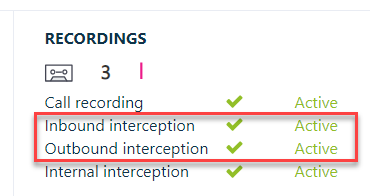
Changed and new Recording and Interception settings. 3 existing settings have been given new behavior, and 2 new settings have been introduced to better reflect the name of all the settings, and to allow more granular behavior. Existing but changed settings: - UseAudioRecording = Will now only enable recording of established inbound calls to a UCC endpoint. - UseInboundAudioRecording = Will now only enable recording of inbound direct calls to an agent but requires inbound-interception to be enabled separately. - UseOutboundAudioRecording = Will now only enable recording of outbound direct calls for the following 3 scenario's:
Previously this setting used to enable outbound-interception only, using native Teams client and would only record calls if New settings:
Important The graphical dashboard on the top of the UCC SharePoint main management page will not always reflect the correct behavior (i.e. recording active or not) as no new Ucc.Creator is available to interpret these new settings in the SharePoint dashboard. |
Feature enhancements
| PBI | Description |
|---|---|
| 94673 |
Graph Presence re-authentication mechanism now more resilient. The re-authentication mechanism for the Presence provider has been improved to allow for more settings changes on the Presence account if performed on customer side. This will now allow for uninterrupted re-authentication and continuity of the Presence Provider. |
| 102548, 105477, 105572 |
UCC's will now resubscribe for presence when mis-typed Teams In Windows Active Directory, a User Principal Name (UPN) is the name of a system user in an email address 'like' format. A UPN (for example: john.doe@domain.com) consists of the user name (logon name), separator (the @ symbol), and domain name (UPN suffix). is corrected. When an agent that is already an agent in another UCC on the same service, gets added to a second UCC but there is a typo in the Teams UPN which gets corrected, this resulted in a presence error for all UCC's that agent is in. This now gets resubscribed on-the-go without requiring re-adding all affected agent references or a service restart without cache. |
| 89580, 99062, 95178, 108181, 107463, 107579 |
Incremental retries for Throttling, in the context of a software cloud delivery service, is the practice of temporarily suspending or diminishing access to a service offering to a cloud customer. Because cloud platforms are mostly multi-tenant, shared platforms and the usage at any moment of many customers is unpredictable, throttling is a normal and logical procedure of retaining a cloud service for all customers, sometimes at the expense of one or a handful of customers who are at that time using too many resources for the backend platform. Not only a customer itself, but also a "noisy neighbour" on the same platform can be the cause of throttling. Usually service will be resumed at a normal level after a short cool-down period, but can even take up to 24 hours or more. In Microsoft 365 throttling is usually indicated by "429 errors" or "server too busy" messages in logfiles or replies. of Events for expired UCC credentials [ SQL & SharePoint] to improve stability. When throttling events occur due to temporary loss or expired/withdrawn authentication credentials to either SQL or SharePoint, connection retries will occur at ever increasing intervals to prevent over-exhaustion of the same event on internal systems. This will improve stability and maintenance of backend systems. |
| 99961, 103773 |
Native Teams WebAgent as an App now has working "Support" hyperlink. When using WebAgent as an App within the Teams client, the native Teams "Support" hyperlink in the App properties view (next to "Terms Of Use" and "Privacy policy") in the App now directs to the AnywhereNow support website. |
| 107840, 109811, 105699 |
Snapper can now be set up for auto answer of all calls Microsoft's "New" Teams client. Microsoft has spent the last year introducing a "New" Teams client to completely replace the "Classic" Teams client by March 31st 2024. AnywhereNow has added support for enabling Auto-Answer of All calls into the New Teams client. The "New" client type must be selected in Snapper settings. See: Preferences |
| 107422, 108138, 108345, 108019 |
Update Client type dropdown naming in Snapper to include New Teams client. In order to support the New Teams client type (for Auto Answer toggle) the drop down menu in Snapper settings and in the install wizard for new installation now includes the client type "New Teams" and "New Teams Direct Routing". See: New Teams |
| 86761 |
Dialogue Studio underlying platform updated to version 3.1 The platform underlying our Dialogue Studio (Node Red V3) has been updated to a stable version 3.1.5. |
Resolved issues
| PBI | Description |
|---|---|
| 106271 |
Fix discharge and stuck reservation on agent after double skill transfer. When a call was Skill transferred twice by the same agent, the agent would not get wrap-up and his reservation would persist until the AgentReservationManager releases the reservation after the call had ended. This is no longer the case. |
| 101833, 102107, 102413, 102522, 102523, 102586, 102826, 104605, 106964 |
Call stuck in transfer state after failed transfer In some rare cases failed transfer could not resume that call by agents. Transfer mechanisms have now been made more resilient. |
| 101879 |
5 second delay to disconnect Agent A during direct transfer. Enhanced behavior when multiple transfer signals (button presses, refreshes, api etc.) to same or different destinations were sent should now result in only the main transfer to be processed. |
| 104822 |
Fixed outbound intercepted transfer to other UCC endpoint. When an outbound intercepted call is transferred to a side instep endpoint, the original callee was called back. This is no longer the case. |
| 106417 |
DashboardService - Only set a default MSMQ queue when there are no other explicit settings. In case of a misconfigured Snapper, the Dashboard service can spam the default MSMQ for all services on a host. In case of multi-tenant setups, it can lead to a potential security flaw. With this change, the default queue won't be created/used in case there are already specific queues configured. |
| 102465 |
Initialtalktime not correct after consult transfer. InitialTalkTime is now set correctly when a consultative transfer completes |
| 103749 |
Outbound intercepted calls with hunter type = SfbHunter uses impersonation again. Outbound calls can now call on behalf of the ucc endpoint again if the hunting type SfBHunter was set (contrary to the more prolific setting UseTeamsHunter). |
| 105778, 105779, 105917, 105918, 106150, 104137, 104448 |
Recognition of SipUri's as wrapped telephone numbers tightened. When constructing a SipUri object from a sip: URI string, there are several chances to set its IsPhone property to true. When a sip: URI is found with something claiming to be an actual phone number in it, require that that is either 'anonymous' or looks like a well-formed phone number. Previously, any string was allowed, but false positives were encountered in the wild, prompting stricter inspection. |
| 104576, 106406 |
DTMF timeout from Dialogue Studio no longer generates error in UCC log. Read input from DTMF with (user defined) timeout reached should not result in an error in the Core UCC logs. This has now been fixed. |
| 87122 |
Show offline presence in WebChat when UCC is offline. The WebChat client on customer side will now show as offline if the UCC service behind it is stopped and can therefore not process any messages. |
| 105384, 105439 |
WhatsApp for Vonage and CM to support multiple Number across different UCC's Previously the WhatsApp messaging connector to Vonage and to CM supported only one phone number to be recognized and processed by a service/customer. Now if multiple phone number entry points for messaging are configured on Vonage or CM their can each be linked to their own UCC. This way multiple WhatsApp text message communication channels can be enabled. UPDATE 02-07-2024: This feature currently only works in the Dialogue Provider for Vonage, not the Dialogue Provider for CM.
|
| 95247, 95439 |
Scrolling through a long list of UCC's in WebAgent now possible again. When a long list of UCC's (more than 5) is shown in the MePerson drop down menu of an agent and the menu got expanded with the , scrolling through this list is now possible again |
| 102656, 103103, 103109 |
Webagent in Teams - Buttons are missing if the window is made too small. Not all buttons for navigating in the WebAgent were visible when the window was made too small. This was especially noticeable in the when running WebAgent inside the Teams client (or even the mobile Teams client). This has now been optimized. |
| 101150, 103803 |
Missed/Incoming/Outgoing calls sometimes showing all calls. When switching between views in the CallHistory of WebAgent, sometimes all calls were shown instead of the view category seleted. This is no longer the case. |
| 95933, 95956 |
Missing new mail indicators on several places in WebAgent. A new mail indicator (red orb/dot) has been added in several more places (on the favicon of browser tab, the left hand WebAgent menu and personal queue tab). |
| 100928, 102659 |
Send button no longer greyed out. If the response of an agent was only one character then the send button remained greyed out during active webchat session. This is no longer the case. |
| 96953, 99576 |
Send button behavior enhancement. Send button remains disabled when pasting a text on text editor of a chat conversation |
| 97595, 98036 |
Add CRM details to Personal queue in WebAgent. The identity (e.g. name or company) details of a customer collected from CRM are now shown in the personal queue window in WebAgent. |