How to Permanently REMOVE a UCC server configuration from Dialogue Studio?
If you have configured Dialogue Studio for a A Unified Contact Center, or UCC, is a queue of interactions (voice, email, IM, etc.) that are handled by Agents. Each UCC has its own settings, IVR menus and Agents. Agents can belong to one or several UCCs and can have multiple skills (competencies). A UCC can be visualized as a contact center “micro service”. Customers can utilize one UCC (e.g. a global helpdesk), a few UCC’s (e.g. for each department or regional office) or hundreds of UCC’s (e.g. for each bed at a hospital). They are interconnected and can all be managed from one central location. but would like or need to permanently remove a UCC server configuration.
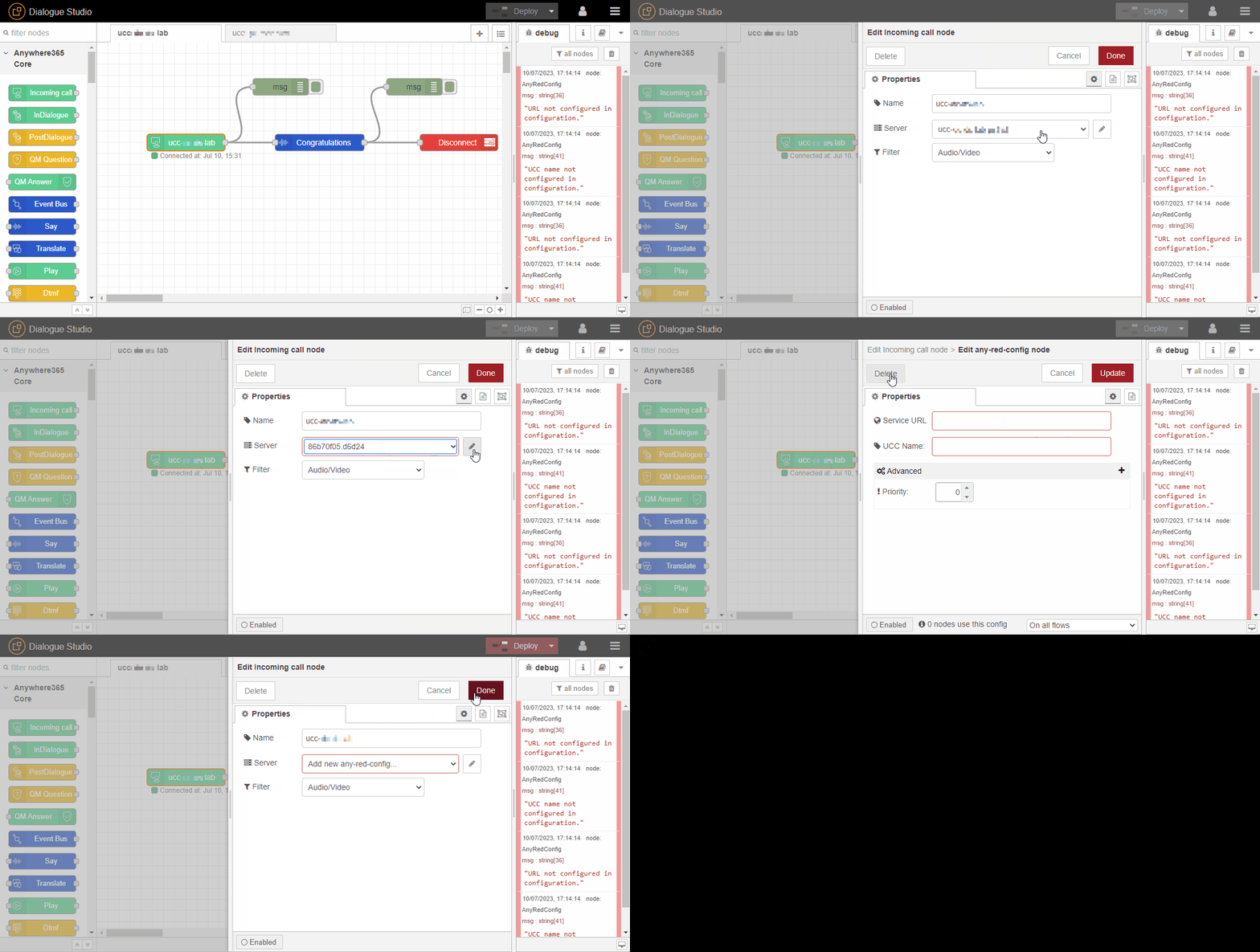
Delete the UCC and server definition from the node Properties.
-
In Dialogue Studio double-click on the Incoming call node to open the Properties dialogue.
-
In the Server drop-down menu select which server config you wish to remove.
-
Click on the Edit button (pencil icon) next to the server drop down.
-
Click Delete button in the Edit any-red-config node screen.
-
Click Done button on the on top of the window to save your changes.
-
Click Deploy.