Create UCC Sites
The UCC A Unified Contact Center, or UCC, is a queue of interactions (voice, email, IM, etc.) that are handled by Agents. Each UCC has its own settings, IVR menus and Agents. Agents can belong to one or several UCCs and can have multiple skills (competencies). A UCC can be visualized as a contact center “micro service”. Customers can utilize one UCC (e.g. a global helpdesk), a few UCC’s (e.g. for each department or regional office) or hundreds of UCC’s (e.g. for each bed at a hospital). They are interconnected and can all be managed from one central location..Site.Creator.ps1 script creates new UCC (Unified Contact Center) sites on SharePoint Online. Each site includes all required lists, content types, views, and the modern UCC Dashboard.
Note
We are looking into adding new subsites creation to this script (on existing Site Collections for UCCs, on tenants where subsites are still allowed).
Before You Begin
Ensure you have:
- Completed the Prerequisites
- Deployed the UCC Dashboard (Deploy UCC Dashboard)
- PowerShell 7.4.6+ installed
Basic Usage
Example: With Certificate Authentication (Recommended)
# Store password securely in temporary memory
$certPassword = Read-Host -AsSecureString -Prompt "Enter certificate password"

# Create the UCC site
.\UCC.Site.Creator.ps1 `
    -paramUccName "ucc-sales" `
    -paramUccTitle "Sales Contact Center" `
    -paramSiteCollectionTitle "Sales Department" `
    -paramSiteCollectionUrl "https://contoso.sharepoint.com/sites/ucc-sales" `
    -paramSiteOwner "admin@contoso.onmicrosoft.com" `
    -paramCertificateAppId "your-client-id" `
    -paramCertificateTenantId "your-tenant-id" `
    -paramCertificatePath "C:\Certs\cert.pfx" `
    -paramCertificatePassword $certPassword
Example: With Interactive Authentication
.\UCC.Site.Creator.ps1 `
    -paramUccName "ucc-sales" `
    -paramUccTitle "Sales Contact Center" `
    -paramSiteCollectionTitle "Sales Department" `
    -paramSiteCollectionUrl "https://contoso.sharepoint.com/sites/ucc-sales" `
    -Interactive `
    -paramInteractiveClientId "your-client-id"
Example: Using Subsites and Interactive Authentication
Requires additional details from UCC_Creator list
.\UCC.Site.Creator.ps1 `
    -paramSiteCollectionUrl "https://contoso.sharepoint.com/sites/ucc-sales" `
    -paramInteractiveClientId "your-client-id" `
    -UseSubSites `
    -Interactive
Example: Using Configuration File
Edit configuration.xml with your credentials, then run:
.\UCC.Site.Creator.ps1 `
    -paramUccName "ucc-sales" `
    -paramUccTitle "Sales Contact Center" `
    -paramSiteCollectionUrl "https://contoso.sharepoint.com/sites/ucc-sales"
Parameters
Required Parameters
| Parameter | Description |
|---|---|
-paramUccName
|
Internal name for the UCC site (no spaces, used in URLs) |
-paramUccTitle
|
Display title for the UCC site |
-paramSiteCollectionUrl
|
Full URL where the site will be created |
Authentication Parameters
| Parameter | Description |
|---|---|
-paramCertificateAppId
|
Entra ID Formerly known as Azure Active Directory (or Azure AD, or AAD) application (client) ID |
-paramCertificateTenantId
|
Entra ID tenant (directory) ID |
-paramCertificatePath
|
Path to the .pfx certificate file |
-paramCertificatePassword
|
Certificate password as SecureString |
-Interactive
|
Use browser-based authentication |
-paramInteractiveClientId
|
Client ID for interactive authentication |
Optional Parameters
| Parameter | Default | Description |
|---|---|---|
-paramSiteOwner
|
From config | Site collection owner email |
-paramSiteCollectionTitle
|
AnywhereNow UCC | Site collection title (top of page) |
-paramLanguage
|
English | Language for list content (English, Dutch, German, French) |
-UseSubSites
|
n.a. |
Enables subsite provisioning mode — processes pending requests from the Available since v8.4.1.8
|
-UseSiteCollectionAppCatalog
|
n.a. | Installs the UCC Dashboard app from the site collection app catalog Available since v8.4.1.8 |
-SiteCollectionPreCreated
|
n.a. |
Skips site collection creation — required for Sites.Selected deployments Available since v8.4.1.8
|
What the Script Does
The script performs these steps:
- Creates Site Collection - Creates a new Communication Site if it doesn't exist
- Configures Site Collection - Adds site columns, content types, and the A365_UCC_Creator list
- Provisions UCC Lists - Creates all UCC lists (Agents, Skills, Queues, etc.)
- Adds Content Types - Adds UCC-specific content types to lists
- Configures Views - Sets up default and custom views
- Imports Default Data - Populates lists with default settings and values
- Creates Home Page - Creates Home.aspx with the UCC Dashboard web part (full-width)
- Sets Site Logo - Applies the AnywhereNow logo
- Applies Schema Updates - Adds any new columns required by recent versions
- Disables Comments - Disables page comments for cleaner UI
Expected Output
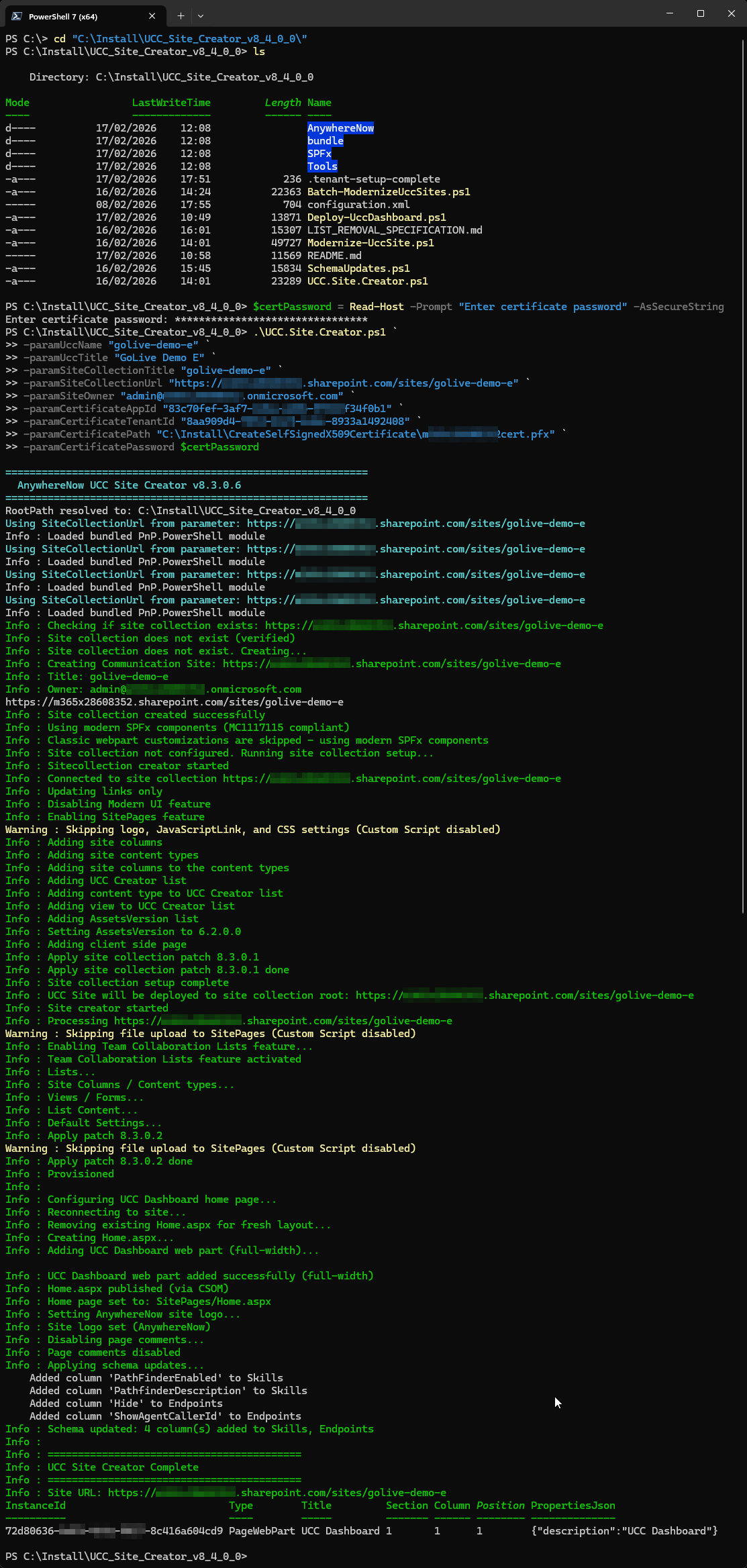
A successful site creation looks like this (simplified/mockup view):
============================================================
  AnywhereNow UCC Site Creator v8.4.2.1
============================================================

Info : Checking if site collection exists: https://contoso.sharepoint.com/sites/ucc-sales
Info : Site collection does not exist. Creating...
Info : Creating Communication Site: https://contoso.sharepoint.com/sites/ucc-sales
Info : Title: Sales Contact Center
Info : Owner: admin@contoso.onmicrosoft.com
Info : Site collection created successfully

Info : Using modern SPFx components (MC1117115 compliant)
Info : Site collection not configured. Running site collection setup...
Info : Adding site columns
Info : Adding site content types
Info : Adding UCC Creator list
Info : Site collection setup complete

Info : Site creator started
Info : Processing https://contoso.sharepoint.com/sites/ucc-sales
Info : Lists...
Info : Site Columns / Content types...
Info : Views / Forms...
Info : List Content...
Info : Default Settings...
Info : Provisioned

Info : Configuring UCC Dashboard home page...
Info : Creating Home.aspx...
Info : Adding UCC Dashboard web part (full-width)...
Info : UCC Dashboard web part added successfully (full-width)
Info : Home page set to: SitePages/Home.aspx
Info : Site logo set (AnywhereNow)
Info : Page comments disabled
Info : Applying schema updates...
Info : Schema is up to date

Info : ==========================================
Info : UCC Site Creator Complete
Info : ==========================================
Info : Site URL: https://contoso.sharepoint.com/sites/ucc-sales
Multi-Language Support (partially)
The script supports multiple languages for list content. Specify the language using the -paramLanguage parameter:
.\UCC.Site.Creator.ps1 `
    -paramUccName "ucc-verkoop" `
    -paramUccTitle "Verkoop Contact Center" `
    -paramSiteCollectionUrl "https://contoso.sharepoint.com/sites/ucc-verkoop" `
    -paramLanguage "1043" `
    ...
Supported list and content languages:
- English (default or 1033)
- Dutch (or 1043)
- German (or 1031)
- French (or 1036)
Creating Multiple Sites
Option 1: Run the Script Multiple Times
# Site 1
.\UCC.Site.Creator.ps1 -paramUccName "ucc-sales" -paramUccTitle "Sales" ...

# Site 2
.\UCC.Site.Creator.ps1 -paramUccName "ucc-support" -paramUccTitle "Support" ...

# Site 3
.\UCC.Site.Creator.ps1 -paramUccName "ucc-hr" -paramUccTitle "HR" ...
Option 2: Use a Loop
$sites = @(
    @{ Name = "ucc-sales"; Title = "Sales Contact Center" },
    @{ Name = "ucc-support"; Title = "Support Contact Center" },
    @{ Name = "ucc-hr"; Title = "HR Contact Center" }
)

foreach ($site in $sites) {
    .\UCC.Site.Creator.ps1 `
        -paramUccName $site.Name `
        -paramUccTitle $site.Title `
        -paramSiteCollectionUrl "https://contoso.sharepoint.com/sites/$($site.Name)" `
        -paramCertificateAppId "your-client-id" `
        -paramCertificateTenantId "your-tenant-id" `
        -paramCertificatePath "C:\Certs\cert.pfx" `
        -paramCertificatePassword $certPassword
}
Deploying to an Existing Site
If the site collection already exists, the script will:
- Skip site creation
- Check if UCC is already configured
- Add UCC lists and content to the existing site
This allows you to add UCC functionality to an existing SharePoint site.
Troubleshooting
 "Required variables not set" Error
Cause: Authentication parameters are missing or invalid.
Solution:
- Ensure all certificate parameters are provided, OR
- Use
-Interactivefor browser-based login, OR - Configure
configuration.xmlwith valid credentials
UCC Dashboard Web Part Not Available
Cause: The SPFx package hasn't been deployed to the tenant.
Solution: Run Deploy-UccDashboard.ps1 first.
Site Already Exists Error
Cause: A site with the same URL already exists.
Solution:
- Use a different URL, OR
- Delete the existing site first, OR
- The script will add UCC to the existing site
"Custom Script Disabled" Warnings
Info: These warnings are expected in modern SharePoint. The script uses SPFx components that don't require custom scripts.
Lists Created
The script creates the following lists:
| List | Purpose |
|---|---|
| Agents | Contact center agents |
| Skills | Agent skills and routing rules |
| Queues | Call queues configuration |
| IVRQuestions | Call flow IVR Interactive Voice Response, or IVR, is a telephone application to take orders via telephone keypad or voice through a computer. By choosing menu options the caller receives information, without the intervention of a human operator, or will be forwarded to the appropriate Agent. definitions |
| Settings | Site-level settings |
| SettingValues | Setting value options |
| UccEndpoints | Endpoint configurations |
| ...and more | Additional UCC-specific lists |
Next Steps
- Configure your UCC site through the UCC Dashboard
- Add agents, skills, and queues
- For existing UCC sites that need upgrading, see Modernize Existing Sites
Media Gallery
Videos
Ucc.Site.Creator with certificate authentication - part 1
Long pauzes (when data is being pushed to online) removed
Ucc.Site.Creator with certificate authentication - part 2
Long pauzes (when data is being pushed to online) removed
Screenshots
Full Ucc.Site.Creator run with certificate authentication