UCC Site Creator (Modernized) - Overview & Prerequisites
Introduction
The UCC A Unified Contact Center, or UCC, is a queue of interactions (voice, email, IM, etc.) that are handled by Agents. Each UCC has its own settings, IVR menus and Agents. Agents can belong to one or several UCCs and can have multiple skills (competencies). A UCC can be visualized as a contact center “micro service”. Customers can utilize one UCC (e.g. a global helpdesk), a few UCC’s (e.g. for each department or regional office) or hundreds of UCC’s (e.g. for each bed at a hospital). They are interconnected and can all be managed from one central location. Site Creator package provides PowerShell scripts and content for deploying and managing AnywhereNow UCC (Unified Contact Center) sites on SharePoint Online. This package uses modernized components and instructions only and is compliant with Microsoft's modernization guidelines and deactivation of several classic SharePoint publishing features, as outlined in the MC1117115 announcement.
Why Modernization Matters
In an ongoing effort to wean customers off of legacy SharePoint versions and features (like SharePoint Server editions, classic features, custom scripts, use of subsites, AACS Azure Access Control Services (AACS), a deprecating authentication service of Microsoft Azure used to connect to (among other services) SharePoint online. In the past this was often abbreviated to ACS. Not to be confused with the similarly named and newer acronym ACS (Azure Communication Services). authentication, and more) Microsoft is steadily deprecating features to keep SharePoint on a Modern, Compliant and Secure level.
 Read more
When we look at AnywhereNow's Ucc.Creator you may have already noticed this when "AllowCustomScripts" was no longer allowed permanently as of November 2024 (could be re-enabled for 24 hours periods only). The next deprecation candidates were several classic SharePoint publishing features which were announced for deprecation on September 15th 2025 (with an option to delay this with a one time temporary extension until March 15th 2026, see MC1117115). Following that, on April 2nd 2026 SharePoint Add-Ins and AACS authentication will be disabled. Microsoft calls the adoption of the new SharePoint standards and features Modernization, and advises rebuilding any custom graphical use interfaces and forms using the SharePoint Framework extensibility model (SPFx).
Ideally, full modernization requires data/content of a classic site to be exported -> the site deleted -> completely rebuilt as a modern site -> data/content to be restored where possible.
However, light modernization allows for a classic site to be partially converted to use modern features (but not all) and to disable or delete deprecating classic features in use. AnywhereNow has opted for this light model for modernizing existing UCC sites, which retains the data/content in the existing lists and libraries and accessible under the same URL's (only the homepage will be new and to modernized standard).
What this means for AnywhereNow's SharePoint UCC Sites
New UCC sites needed after deprecation of these features will have to to be created using the new scripts and will use the SPFx based UCC-Dashboard, and need to be installed on a single site per UCC (a continuation of our OneUCC Available since UCC.Creator v8.2.0.7. The model (preferred by Microsoft) in SharePoint on Microsoft 365 where no subsites are allowed. In this model each UCC will need its own separate SharePoint site (formerly known as site collection). This does allows for more granular user access and template updates per UCC. model). Creating UCC sites and subsites(!) creation using the legacy Anywhere365 Ucc.Creator scripts are expected to stop functioning after deprecation of these features.
Existing UCC sites, whether they are OneUCC sites or UCC Site Collections with (nested) subsites per UCC (i.e. those which use the classic portal.aspx homepage), we strongly advise to modernize them to use the new SPFx-based UCC-Dashboard before the deprecation deadline to give your end-users a continued experience. We have provided a new script package outlined below to treat modernization of existing sites as well a being able to build new UCC sites.
Important UCC continuity distinction!
-
Existing UCC (sub)sites will continue to communicate with Dialogue Cloud UCC's if not modernized, but user interaction (by a supervisor or admin) using the legacy Anywhere365-dashboard may deteriorate or stop after March 15th 2026 (access to native views of SharePoint lists and libraries will be the only fallback)
-
Existing UCC (sub)sites will cease to communicate with Dialogue Cloud UCC's if certificate authentication is not enabled before April 2nd 2026 as outlined in earlier communications (see: Migrating from ClientSecret to Dialogue Cloud Certificate Authentication)
What's Included
| Script | Purpose |
|---|---|
Deploy-UccDashboard.ps1
|
One-time template setup - deploys the UCC Dashboard SPFx package tenant wide for use by all UCC sites. (Optionally per site collection only) |
Modernize-UccSite.ps1
|
Modernizes (or updates already modernized) single existing UCC sites to use the modern dashboard |
Batch-ModernizeUccSites.ps1
|
Modernizes (or updates already modernized) multiple existing UCC sites in batch |
UCC.Site.Creator.ps1
|
Creates new UCC sites with all lists, content types, and the modern dashboard |
Typical Workflows
For existing deployments (most common):
- Deploy UCC Dashboard (either TenantWide or SiteCollection App Catalog deployment, and re-run when updating to a new version). Average time to run: 30 seconds - 1 minute.
- Modernize existing UCC sites (site per site or in bulk, or combination thereof and re-run when requested for updating to a new version). Average time to run: 1 minute - 2 minutes, per site.
For new deployments:
- Deploy UCC Dashboard (one tenant wide deployment, or re-run when updating to a new version ). Average time to run: 30 seconds - 1 minute.
- Create UCC Sites as needed (site per site, or in series). Average time to run: 15 minutes - 30 minutes per site.
Prerequisites
PowerShell Requirements
- PowerShell 7.4.6 or higher is required
- Windows PowerShell 5.1 is NOT supported
- The PnP.PowerShell module (v3.1.0) is bundled with the package - no separate installation needed
To check your PowerShell version:
To install PowerShell 7 (if needed):
Or check Microsoft's guidance for other installation methods on: install-powershell-on-windows
Entra ID App Registration
All scripts and authentications methods require a Microsoft Entra ID Formerly known as Azure Active Directory (or Azure AD, or AAD) application for authentication. You need to register an app with the appropriate permissions.
Tip
You may (or should) already have an Entra ID Formerly known as Azure Active Directory (or Azure AD, or AAD) App for previous AnywhereNow installation usage. It is perfectly fine to re-use or enhance that existing App.
Tip 2
A package version and procedure for controlling reduced permission access is also available,
Please read: UCC Site Collection Deployment — Sites.Selected Permission Model
Step 1: Register the Application
- Go to the Azure Portal
- Navigate to Microsoft Entra ID → App registrations
- Click New registration
- Enter a name (e.g., "UCC Site Creator")
- Select Single tenant only
- Click Register
- Note the Application (client) ID - you'll need this later
- Note the Directory (tenant) ID - you'll need this later
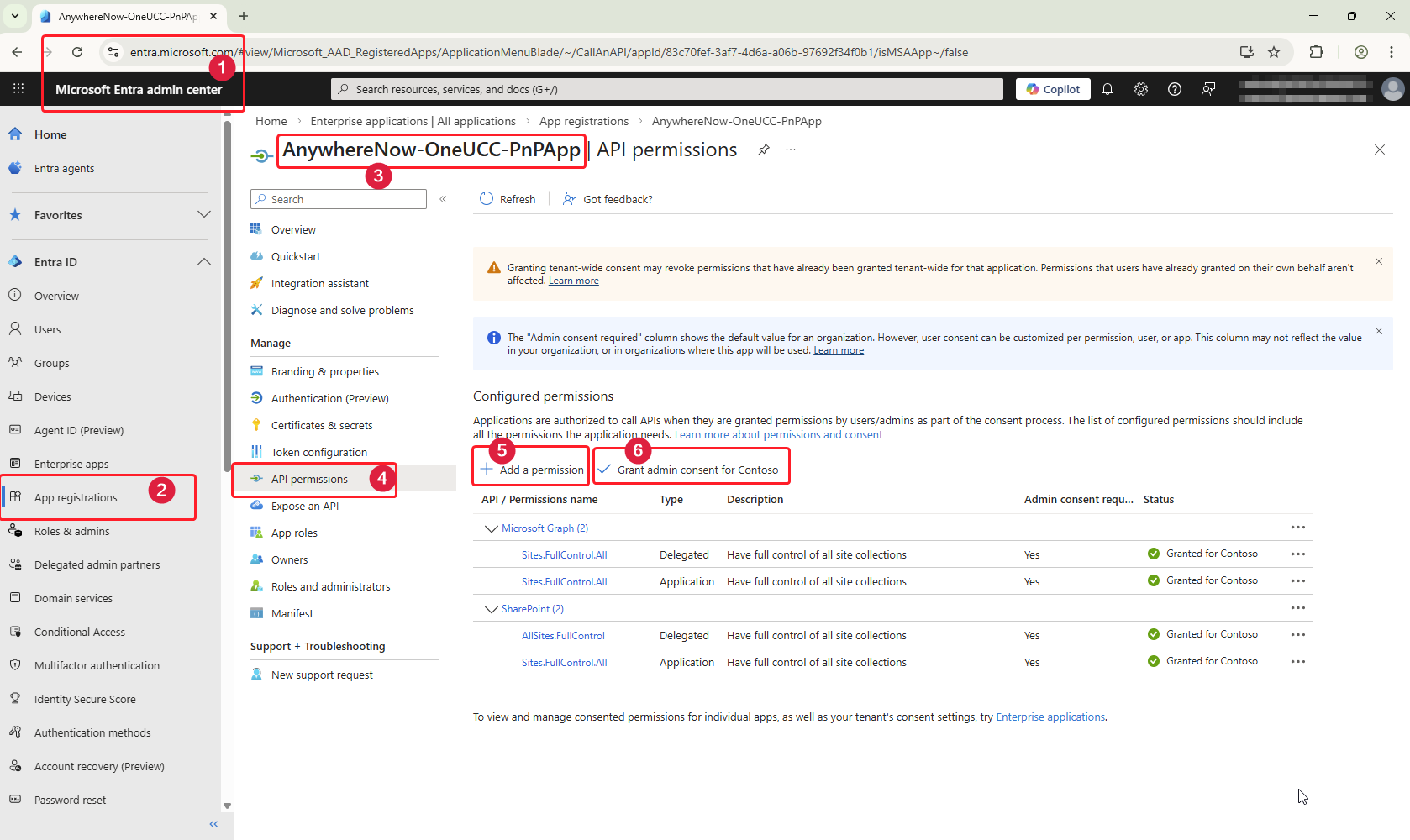
Step 2: Configure API Permissions
The scripts require both Microsoft Graph and SharePoint API permissions.
- In your app registration, go to API permissions
- Click Add a permission
Add Microsoft Graph permissions:
- Select Microsoft Graph
- Select Application permissions* (when using the recommended AppOnly with Certificate authentication)
- Add:
Sites.FullControl.All
Add SharePoint permissions:
- Click Add a permission again
- Select SharePoint
- Select Application permissions* (when using the recommended AppOnly with Certificate authentication)
- Add:
Sites.FullControl.All
Grant admin consent:
- Click Grant admin consent for [your organization]
- Confirm both permissions show "Granted" status
Your configured permissions could look like this (or limited to only Application or Delegated Type):
| API | Permission | Type | Status |
|---|---|---|---|
| Microsoft Graph | Sites.FullControl.All
|
Application* | Granted |
| SharePoint | Sites.FullControl.All
|
Application* | Granted |
| Microsoft Graph | Sites.FullControl.All
|
Delegated* | Granted |
| SharePoint | AllSites.FullControl
|
Delegated* | Granted |
* To run the scripts with "Interactive" authentication, only the Delegated permissions are required. To run the scripts with "Certificate " authentication, only the Application permission are required.
Why These Elevated Permissions Are Required?
The UCC Site Creator scripts require elevated SharePoint permissions (Sites.FullControl.All) to perform administrative tasks such as creating site collections, deploying the UCC Dashboard to the tenant App Catalog, and provisioning lists and content types. These permissions are only exercised during initial site deployment or when running modernization updates—they are not used by the AnywhereNow Dialogue Cloud platform during day-to-day UCC operations. The scripts are executed exclusively by the customer's own IT administrators or by a trusted implementation partner, within the customer's own tenant environment. Once deployment is complete, the Entra ID app registration can be disabled or have its permissions reduced if desired, as it is not required for ongoing UCC functionality.
The UCC Site Creator scripts perform a wide range of SharePoint operations that require elevated access. These include creating new site collections, deploying SPFx packages to the tenant App Catalog, provisioning lists and content types, uploading files, configuring site settings, and modifying page layouts. The SharePointSites.FullControl.All application permission grants the scripts the ability to read and write content across all site collections in your tenant, which is necessary for both creating new UCC sites and modernizing existing ones.
The Microsoft GraphSites.FullControl.All application permission is required for tenant-level operations that PnP PowerShell performs through the Microsoft Graph API. This includes operations like creating new site collections (New-PnPSite), accessing the tenant App Catalog, and deploying SPFx packages tenant-wide. While the SharePoint permission handles most site-level operations, certain administrative actions—particularly those involving site provisioning and tenant-wide app deployment—rely on Microsoft Graph endpoints and require this additional permission to function correctly.
Tip
A package version and procedure with reduced permission is now also available,
See: UCC Site Collection Deployment — Sites.Selected Permission Model
Step 3: Create and Add Certificate to App
The scripts use certificate-based authentication (recommended method).
You can create a self-signed certificate with the newly introduced 'New-SelfSignedCertificate' command in PnP.PowerShell, or use a certificate from your organization's PKI.
Create a self-signed certificate (PowerShell):
$certName = "ModernUccSiteCreator"
$cert = New-SelfSignedCertificate -Subject "CN=$certName" `
    -CertStoreLocation "Cert:\CurrentUser\My" `
    -KeyExportPolicy Exportable `
    -KeySpec Signature `
    -KeyLength 2048 `
    -KeyAlgorithm RSA `
    -HashAlgorithm SHA256 `
    -NotAfter (Get-Date).AddYears(2)

# Export the certificate with private key (PFX)
$password = ConvertTo-SecureString -String 'EnterYourPasswordHere' -Force -AsPlainText
Export-PfxCertificate -Cert $cert -FilePath "C:\Certs\$certName.pfx" -Password $password

# Export the public key (CER) for uploading to Azure
Export-Certificate -Cert $cert -FilePath "C:\Certs\$certName.cer"

Write-Host "Certificate created: C:\Certs\$certName.pfx"
Write-Host "Public key for Azure: C:\Certs\$certName.cer"
You may want to rename the following values in the above example to tailor to your needs:
-
"ModernUccSiteCreator" - replace this with a name adhering to your naming conventions
-
.AddYears(2) - to restrict the validity of the certificate and password to adhere to your security policies.
-
'EnterYourPasswordHere' - enter a complex password adhering to your security policies (has single quotes for catching special characters which may be used in passwords like $, ` or ")
-
C:\Certs\ - change the folder to where you want to save the certificate files for storage and later retrieval
Also, check Microsoft's guidance and more information on creating and troubleshooting self signed certificates on: how-to-create-self-signed-certificate
Step 4: Upload Certificate to your Entra ID
- In your app registration, go to Certificates & secrets
- Under Certificates, click Upload certificate
- Upload the
.cerfile (public key) you exported - Click Add
Authentication Options
Option 1: Certificate Authentication (Recommended for day-to-day use and automation)
Uses certificate-based authentication and an Entra ID app. No user interaction required.
.\Modernize-UccSite.ps1 `
    -ClientId "your-client-id" `
    -CertificatePath "C:\path\to\cert.pfx" `
    -CertificatePassword $securePassword `
    -Tenant "contoso.onmicrosoft.com" `
    ...
Option 2: Interactive Authentication (Recommended for Testing)
Uses browser-based login and an Entra ID app. No certificate needed, but requires repeated user interaction to authenticate.
Option 3: Configuration File (for UCC.Site.Creator script only)
You can store credentials in configuration.xml to avoid passing them on every command:
<?xml version="1.0" encoding="utf-8" ?>
<Configuration>
  <CertificateAppId>your-client-id</CertificateAppId>
  <CertificateTenantId>your-tenant-id</CertificateTenantId>
  <CertificatePassword encrypted="false">your-password</CertificatePassword>
  <CertificatePath>C:\path\to\cert.pfx</CertificatePath>
  <SiteOwner>admin@yourtenant.onmicrosoft.com</SiteOwner>
</Configuration>
Security Note
For production environments, encrypt the password using .\Tools\encryptpassword.ps1 and set encrypted="true". Note that encrypted passwords are machine-specific.
Download
version: 8.4.2.1 (for changed since v8.4.1.8 see: What's New in UCC Site Creator v8.4.2.1)
Note
Remember you may need to 'Unblock' the .zip files in the file properties after downloading and before unzipping!
Important
Upgrading from version 8.4.1.8 or earlier is a two-step process:
-
Run the Deploy script (with applicable options), to upload the ucc-dashboard-spfx to your selected App Catalog.
See: Deploy UCC Dashboard -
Run Modernization script with the -UpdateAppOnly parameter (if your using the same App Catalog), to re-assign this version of the new UCC dashboard and check and add for missing or new schema items (Lists, Columns, Content Types, etc) on your SharePoint Lists. (Works for standalone or bulk updates with applicable options)
If changing to a different App Catalog method like 'SiteCollectionAppCatalog', run a full site Modernization script, (i.e. without the -UpdateAppOnly parameter).
See: What the Scripts Do
Both will need to be run with -Force parameter. ('-Force' acts as the upgrade method).
Please also see our updated FAQ section for modernization: Modernization
Package Contents
After extracting the package, you'll have the following structure:
UCC_Site_Creator_v8_4_2_1/
├── Deploy-UccDashboard.ps1       # Tenant setup (deploys SPFx dashboard)
├── Modernize-UccSite.ps1         # Single-site modernization
├── Batch-ModernizeUccSites.ps1   # Batch modernization
├── UCC.Site.Creator.ps1          # Main site creation script
├── SchemaUpdates.ps1             # List schema updates module
├── configuration.xml             # Configuration file (edit with your credentials)
├── README.md                     # Technical documentation
├── Tools/
│   ├── Migrate-UccSite.ps1       # Site migration utility (experimental)
│   └── encryptpassword.ps1       # Password encryption helper
├── AnywhereNow/                  # Provisioning assets and scripts
├── SPFx/                         # SPFx package and deployment scripts
└── bundle/                       # Bundled PnP.PowerShell module
Next Steps
Once you have completed the prerequisites:
- Deploy UCC Dashboard - Run once per tenant to deploy the SPFx package (Or run again for updating)
- Create UCC Sites - Create new UCC sites (when new UCCs are needed)
- Modernize Existing Sites - Upgrade your existing Legacy UCC or earlier modernized sites to use the latest modern dashboard
For a quick walkthrough of the most common scenarios, see the Quick Start Guide.
Media Gallery
Videos
Create a certificate
Screenshots
Add Microsoft Entra ID App Permissions