What's new in WebAgent 6.27
Note
An additional Dialogue Cloud WebAgent license is required.
Available in A bundle is a fixed combination of our software platform elements of very specific versions. These are designed and tested to optimally work together to assure their intended function and interoperability.: DC2021.05
Introduction
The below a details of new features that are added to the WebAgent.
UCC Display name
The A Unified Contact Center, or UCC, is a queue of interactions (voice, email, IM, etc.) that are handled by Agents. Each UCC has its own settings, IVR menus and Agents. Agents can belong to one or several UCCs and can have multiple skills (competencies). A UCC can be visualized as a contact center “micro service”. Customers can utilize one UCC (e.g. a global helpdesk), a few UCC’s (e.g. for each department or regional office) or hundreds of UCC’s (e.g. for each bed at a hospital). They are interconnected and can all be managed from one central location. Display name will now be visible in the WebAgent
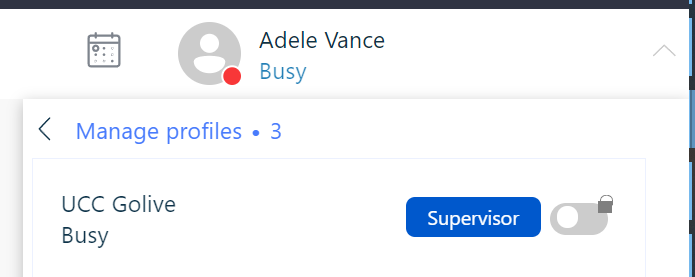
The display name is used in the following places:
-
MePerson
-
Conversation
-
Queue
-
Preview
-
Text Search
Consistent behavior over channels after transfer
For a better and more logic experience the results after a transfer has been improved:
| Action | Audio Session | WebChat Session | Email Session | WhatsApp Session |
|---|---|---|---|---|
| Customer Disconnect |
Conversation goes in Wrapup. |
Conversation goes in Wrapup. |
N/A |
N/A |
| Agent Disconnect |
Conversation goes in Wrapup. |
N/A |
N/A |
N/A |
| Successful Blind Transfer |
Conversation is removed from the Agent. Note If the consultee is also an Agent in the same UCC, then the conversation will be shown to the consultee. |
N/A |
N/A |
N/A |
| Delight Transfer Completed |
Conversation is removed from the Agent. Note If the consultee is also an Agent in the same UCC, then the conversation will be shown to the consultee. |
N/A |
N/A |
N/A |
| Consultative Transfer Completed |
Conversation is removed from the Agent. Note If the consultee is also an Agent in the same UCC, then the conversation will be shown to the consultee. |
N/A |
N/A |
N/A |
| Skill Transfer Completed |
Conversation is removed from the Agent. |
Conversation is removed from the Agent. |
Conversation is removed from the Agent. |
Conversation is removed from the Agent. |
| Agent press handle |
Conversation is removed from the Agent. |
Conversation is removed from the Agent. |
Conversation is removed from the Agent. |
Conversation is removed from the Agent. |
Click2Dial in ServiceNow
Customer who are using the ServiceNow CTI plugin in combination with DCI (Learn More) can now directly call from the ServiceNow interface by clicking on the dial button.
