How to connect to SharePoint sites and list with Microsoft Graph as an Application in Dialogue Studio
SharePoint list access using client credentials and Sites.Selected.
This guide explains how to use Microsoft Graph with application permissions (Sites.Selected) in Dialogue Studio to access SharePoint sites and lists. It allows for operations such as resolving site IDs, reading list items (GET), updating settings (PATCH), and creating new list items (POST).
Important:
Entra App Registration secrets expire and must be maintained in both the Entra app registration and the Dialogue Studio environment variables. Sites.Selected also does not grant automatic access to all SharePoint sites; the runtime app must be granted access to each target site or subsite.
Setup overview
Before running the example flow, complete the following setup. The sections below describe the recommended app model, site permissions, and required environment variables.
-
Create an Entra app registration that will be used by the Dialogue Studio flow.
-
Grant the correct Microsoft Graph application permissions and admin consent.
-
Grant site-specific access to the runtime app for every SharePoint site or subsite the flow needs to read or update.
-
Create a client secret and store the value in Dialogue Studio environment variables, along with the other required values detailed later in this article. Store them in the Dialogue Studio Environment Variables as Credentials for Security.
Recommended app model
1. Runtime app used by the Dialogue Studio flow
This is the app the AnywhereNow Dialogue Studio flow uses to request a token with the client credentials grant and then call Microsoft Graph.
-
Microsoft Graph application permission: Sites.Selected.
-
Used for: resolving site IDs, reading SharePoint list items, updating list items, and creating list items.
-
This app must be explicitly granted access to each required SharePoint site.
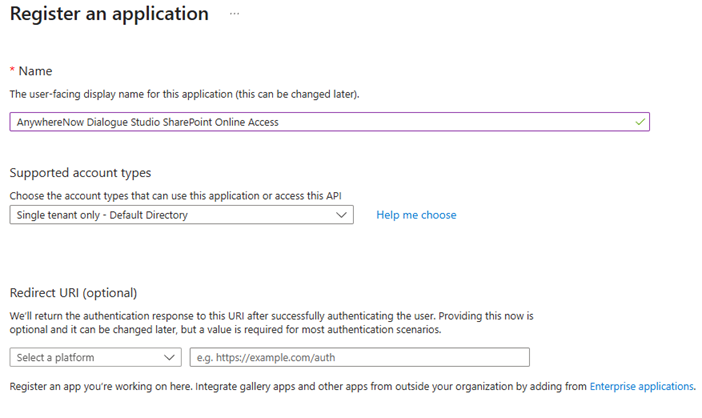
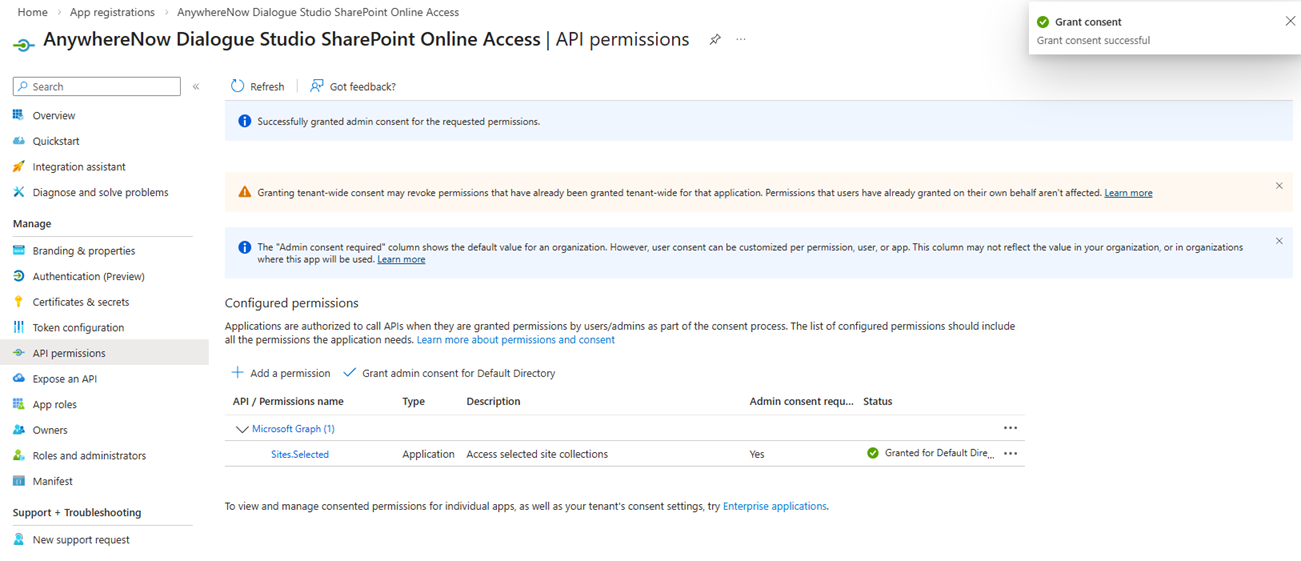
2. An admin app used to grant site permissions
The Sites.Selected app must first be enabled via an admin-level app. This is done once via a second app that is used to assign site permissions to the runtime app created above.
Use the same instructions above to create this Entra application with the elevated permissions required if you do not have one for this purpose already.
-
Microsoft Graph application permission: Sites.FullControl.All.
-
Used for: granting site-level permissions to the runtime app that only has Sites.Selected.
-
Not needed by the live flow itself, but required beforehand during setup.
See the below articles for more information on elevating an app for your chosen Sites hosting AnywhereNow A Unified Contact Center, or UCC, is a queue of interactions (voice, email, IM, etc.) that are handled by Agents. Each UCC has its own settings, IVR menus and Agents. Agents can belong to one or several UCCs and can have multiple skills (competencies). A UCC can be visualized as a contact center “micro service”. Customers can utilize one UCC (e.g. a global helpdesk), a few UCC’s (e.g. for each department or regional office) or hundreds of UCC’s (e.g. for each bed at a hospital). They are interconnected and can all be managed from one central location.(s):
-
Understanding Resource Specific Consent for Microsoft Graph and SharePoint Online | Microsoft Learn
-
Granting permission to Multiple Sites - Powershell Script
You can use this script and update one of the regions in the script with your own Runtime App ID created earlier.
If using EMEA-WEU, the command would be:
PowerShell.\EnableSharePointCertBasedAuth.ps1 -tenantId "73xxxxxxxxxxxxxxxxxxxxxxxxxxxxx12" -appId "14axxxxxxxxxxxxxxxxxxxxx" -appSecret "PQA8xxxxxxxxxxxxxxk0ca." -siteCollection https://customer.sharepoint.com/sites/UCC-1 -region "EMEA-WEU"
Environment variables required
| Variable | What it contains | Notes |
|---|---|---|
| CUST_TENANT_ID | Customer tenant ID / realm | Copied from the customer tenant |
| SPO_GraphApp_ID | Client ID of the runtime Entra app | App has Graph application permission Sites.Selected |
| SPO_GraphApp_SECRET | Client secret of the runtime Entra app | Must be renewed before expiry and updated in Dialogue Studio |
How the flow works
Important:
-
The token request in the flow is based on an Entra application with Sites.Selected permissions only.
-
Before the flow can use that runtime app successfully, site access must already have been granted, typically using an admin app with Sites.FullControl.All.
-
Update the placeholders, for example global.set names and stored keys functions, in the Dialogue Studio flow example to match your own tenant or customer naming convention.
-
If the target list is in a subsite, use the subsite ID rather than the parent site ID.
-
Some SharePoint filters may need the Prefer header value
HonorNonIndexedQueriesWarningMayFailRandomly. This is explained in the function named Get from Test UCC site.
A. Get Graph token
The flow reads the tenant ID, client ID, and client secret from environment variables and posts to the Microsoft identity platform token endpoint using grant_type=client_credentials and the scope https://graph.microsoft.com/.default. The returned access token is stored in global context for later Graph requests.
B. Resolve the site ID for a specific site
The flow calls a Graph URL such as https://graph.microsoft.com/v1.0/sites/your-tenant.sharepoint.com:/sites/ucc-name-here and stores the returned ID. That value is later used in list operations.
C. Resolve the site ID for a specific subsite
If your list is stored below the main site, resolve the subsite path directly and store that returned ID instead. A parent site ID and a subsite ID are not interchangeable.
D. GET list items
For SharePoint lists, custom columns are returned under fields. A good production pattern is to use $expand=fields($select=...) so you only retrieve the columns you need.
E. PATCH an existing list item
The flow first identifies the item to update, extracts the item ID, and then uses PATCH.
F. POST a new item
New SharePoint list items are created by POST and sending a payload with a fields object to the list items endpoint.
Permissions summary
| App | Permission type | Permission | Why it is needed |
|---|---|---|---|
| Runtime app | Microsoft Graph Application | Sites.Selected | Used by the flow to call Graph against only the sites that have been explicitly granted |
| Admin app | Microsoft Graph Application | Sites.FullControl.All | Used beforehand to grant site-specific access to the runtime app |
Example Graph patterns used in the flow
-
https://login.microsoftonline.com/{tenant-id}/oauth2/v2.0/token- Token request -
/sites/{hostname}:/sites/{path}- Resolve site ID -
/sites/{site-id}/lists/Holidays/items?$expand=fields($select=Title,wsp_ucc_holidays_startdatetime,wsp_ucc_holidays_enddatetime)- GET items from Holidays -
/sites/{site-id}/lists/Settings/items/{item-id}/fields- PATCH a Settings item -
/sites/{site-id}/lists/Agents/items- POST create an Agents item
Pre-deployment checklist
-
Runtime app created and admin consent granted.
-
Sites.Selected added to the runtime app.
-
Site permissions granted to the runtime app for every required site or subsite via the Admin App.
-
CUST_TENANT_ID,SPO_GraphApp_ID, andSPO_GraphApp_SECRETadded in Dialogue Studio. -
Secret expiry date recorded and monitored.
-
Correct site ID or subsite ID stored in global context.
Example Flow
Note
This flow requires you to have the contrib-chronos pallet installed.
[{"id":"559da8e2a8c896b3","type":"tab","label":"SharePoint Graph Method - Anonymized","disabled":false,"info":"","env":[]},{"id":"53e39a98b13947ec","type":"group","z":"559da8e2a8c896b3","name":"Get Graph Token","style":{"fill":"#3f93cf","label":true,"color":"#001f60"},"nodes":["636160631f7ec29c","4ac23a77788f3aae","7bb05223824a9ac4","ec0358e5c4dd4b83","3fa417b85c3bb394","ec8717f61d4f87e5","14fc13f0d346ff9a","eaf20ce565f4043c","551fa55ed3c592ec"],"x":94,"y":39,"w":1632,"h":182},{"id":"ca47e6b822061eb5","type":"group","z":"559da8e2a8c896b3","name":"Get the Site Details for a Specific Site","style":{"stroke":"#000000","fill":"#92d04f","label":true,"color":"#000000"},"nodes":["6680819d85cfc11a","edd057cccee0b6f0","50d3d1322e75f8d1","9b71063382ed9f9e","3a546d4e4b9b7e25","84c433b375ef99a4","09db2b4ccba108f6"],"x":94,"y":239,"w":1592,"h":122},{"id":"8084dae3ef355494","type":"group","z":"559da8e2a8c896b3","name":"GET / PATCH / POST via Graph Extra App","style":{"stroke":"#ffC000","fill":"#ffC000","label":true,"color":"#000000"},"nodes":["4999ee8ca15fab04","f8d7c305b2f3c0de","d06fd388d7713798","3157073d4b288cb5"],"x":88,"y":793,"w":1584,"h":604},{"id":"afb3c79ceb925d8e","type":"group","z":"559da8e2a8c896b3","name":"Get the Site Details for a Specific SubSite","style":{"stroke":"#000000","fill":"#92d04f","label":true,"color":"#000000"},"nodes":["7a8b2f81fdba398a","d3ae1bead5986e2e","42eabb1c02496c97","b38a26e5a88f99de","d53a13861c20b16f","3efee871a49d2d0e","9626015dc12e2680"],"x":94,"y":379,"w":1592,"h":122},{"id":"4999ee8ca15fab04","type":"group","z":"559da8e2a8c896b3","g":"8084dae3ef355494","name":"*** PATCH - Example *** UCC General Settings - Update a setting at a specific times to toggle on or off as required.","style":{"label":true,"stroke":"#92d04f","fill":"#e3f3d3","color":"#000000"},"nodes":["51a5b333c83f3a2f","901c4a752f2b2f7a","364e4e6d4a7a4d09","bbbde57fc7aba8e5","0896a01fb00a6ab4","55e91b3e8e8eda27","0be9a572e7768d5f"],"x":114,"y":939,"w":1532,"h":142},{"id":"f8d7c305b2f3c0de","type":"group","z":"559da8e2a8c896b3","g":"8084dae3ef355494","name":"*** POST- Example *** - Add New Agent SP","style":{"fill":"#e3f3d3","label":true,"color":"#000000","stroke":"#92d04f"},"nodes":["b0b430af3d3ccfb7","d7268d41548710eb","2a5766a7d4ab61a5","e2c84a3f0751866a"],"x":114,"y":1119,"w":812,"h":82},{"id":"d06fd388d7713798","type":"group","z":"559da8e2a8c896b3","g":"8084dae3ef355494","name":"*** GET - Example *** - Holidays List Items - Also with Select Statement.","style":{"stroke":"#92d04f","fill":"#e3f3d3","label":true,"color":"#000000"},"nodes":["65047586f2e97d37","01ab23ea13da3bd4","91c31888de8da05c","9be42bfdc3d44cd6"],"x":114,"y":819,"w":1212,"h":82},{"id":"d54495bd8e54119e","type":"group","z":"559da8e2a8c896b3","name":"Get the Site Details for all nested Subsites of a Site Collection","style":{"stroke":"#92d04f","fill":"#e3f3d3","label":true,"color":"#000000"},"nodes":["e5ef949397a6839d","ec2cfa2cd3ab8d14","35715abf73fe0e17","a67c98f4a36970fc","fn_sp_init_01","inj_sp_subsites_01","http_sp_graph_01","fn_sp_walk_01","dbg_sp_done_01","fn_sp_summary_01","dbg_sp_list_01"],"x":94,"y":539,"w":1572,"h":202},{"id":"3157073d4b288cb5","type":"group","z":"559da8e2a8c896b3","g":"8084dae3ef355494","name":"*** POST- Example *** - Add New Agent SP to all Sites in a Collection by their ID","style":{"stroke":"#92d04f","fill":"#e3f3d3","label":true,"color":"#000000"},"nodes":["inj_post_all","fn_prepare_posts","http_post_all","fn_collect_results","dbg_post_summary","dbg_post_details"],"x":114,"y":1239,"w":1322,"h":132},{"id":"636160631f7ec29c","type":"function","z":"559da8e2a8c896b3","g":"53e39a98b13947ec","name":"Request Graph Token","func":"// NOTE - The application and secret is based on an Entra Application with Sites.Selected permissions only.\n// So you need to have enabled the Graph Permissions for this app via the Sites.FullControl.All App prior to using this Flow to get a Toekn via this Entra App.\n\nlet tenantid = env.get('CUST_TENANT_ID') //This is the Tenant Id / Realm of the Application in the customer Tenant.\nlet clientid = env.get('SPO_GraphApp_ID') //This is the Client Id of the Application in the customer Tenant.\nlet clientsecret = env.get('SPO_GraphApp_SECRET') //This is the Client Secret of the Application in the customer Tenant.\nlet granttype = 'client_credentials'\nlet scope = 'https%3A%2F%2Fgraph.microsoft.com%2F.default'\n\n\nmsg.method = \"POST\"\nmsg.payload = \"client_id=\" + clientid + \"&scope= \" + scope + \"&grant_type=\" + granttype + \"&client_secret=\" + clientsecret;\nmsg.url = \"https://login.microsoftonline.com/\" + tenantid + \"/oauth2/v2.0/token\"\nmsg.headers = { \"Content-Type\": \"application/x-www-form-urlencoded\" }\n\nreturn msg;\n","outputs":1,"timeout":"","noerr":0,"initialize":"","finalize":"","libs":[],"x":420,"y":180,"wires":[["7bb05223824a9ac4"]]},{"id":"4ac23a77788f3aae","type":"inject","z":"559da8e2a8c896b3","g":"53e39a98b13947ec","name":"","props":[{"p":"payload"},{"p":"topic","vt":"str"}],"repeat":"2700","crontab":"","once":true,"onceDelay":"1","topic":"","payload":"","payloadType":"date","x":210,"y":180,"wires":[["636160631f7ec29c"]]},{"id":"7bb05223824a9ac4","type":"http request","z":"559da8e2a8c896b3","g":"53e39a98b13947ec","name":"","method":"use","ret":"obj","paytoqs":"ignore","url":"","tls":"","persist":false,"proxy":"","insecureHTTPParser":false,"authType":"","senderr":false,"headers":[],"x":610,"y":180,"wires":[["551fa55ed3c592ec"]]},{"id":"ec0358e5c4dd4b83","type":"function","z":"559da8e2a8c896b3","g":"53e39a98b13947ec","name":"Set Graph Token - Add your own Name","func":"global.set(\"AT.SharePoint.spoGraphToken\", msg.payload.access_token)\n\nreturn msg;","outputs":1,"timeout":"","noerr":0,"initialize":"","finalize":"","libs":[],"x":1270,"y":180,"wires":[["3fa417b85c3bb394"]]},{"id":"3fa417b85c3bb394","type":"debug","z":"559da8e2a8c896b3","g":"53e39a98b13947ec","name":"Graph Token","active":true,"tosidebar":true,"console":false,"tostatus":false,"complete":"true","targetType":"full","statusVal":"","statusType":"auto","x":1610,"y":180,"wires":[]},{"id":"6680819d85cfc11a","type":"function","z":"559da8e2a8c896b3","g":"ca47e6b822061eb5","name":"Get SP SiteId","func":"let token = global.get('AT.SharePoint.spoGraphToken');\nlet uccName = 'ucc-name-here' // Make sure to add your UCC Name from the SharePoint URL here\n\n// Use the Microsoft Graph API to retrieve the site details\nmsg.method = \"GET\";\nmsg.url = `https://graph.microsoft.com/v1.0/sites/your-tenant-here.sharepoint.com:/sites/${uccName}`;\n\nmsg.headers = {\n \"Authorization\": `Bearer ${token}`,\n \"Content-Type\": \"application/json\"\n};\n\nreturn msg;\n","outputs":1,"timeout":"","noerr":0,"initialize":"","finalize":"","libs":[],"x":400,"y":280,"wires":[["50d3d1322e75f8d1"]]},{"id":"edd057cccee0b6f0","type":"inject","z":"559da8e2a8c896b3","g":"ca47e6b822061eb5","name":"","props":[{"p":"payload"},{"p":"topic","vt":"str"}],"repeat":"","crontab":"35 00 * * *","once":true,"onceDelay":"1","topic":"","payload":"","payloadType":"date","x":210,"y":280,"wires":[["6680819d85cfc11a"]]},{"id":"50d3d1322e75f8d1","type":"http request","z":"559da8e2a8c896b3","g":"ca47e6b822061eb5","name":"","method":"use","ret":"obj","paytoqs":"ignore","url":"","tls":"","persist":false,"proxy":"","insecureHTTPParser":false,"authType":"","senderr":false,"headers":[],"x":610,"y":280,"wires":[["9b71063382ed9f9e"]]},{"id":"9b71063382ed9f9e","type":"debug","z":"559da8e2a8c896b3","g":"ca47e6b822061eb5","name":"Graph answer","active":true,"tosidebar":true,"console":false,"tostatus":false,"complete":"true","targetType":"full","statusVal":"","statusType":"auto","x":780,"y":320,"wires":[]},{"id":"3a546d4e4b9b7e25","type":"function","z":"559da8e2a8c896b3","g":"ca47e6b822061eb5","name":"global.set(\"_SharePoint.ucc-name-here.id\"","func":"global.set(\"_SharePoint.ucc-name-here.id\", msg.payload.id)\n\nreturn msg;","outputs":1,"timeout":"","noerr":0,"initialize":"","finalize":"","libs":[],"x":1290,"y":280,"wires":[["84c433b375ef99a4"]]},{"id":"84c433b375ef99a4","type":"debug","z":"559da8e2a8c896b3","g":"ca47e6b822061eb5","name":"spoID-Stored","active":true,"tosidebar":true,"console":false,"tostatus":false,"complete":"true","targetType":"full","statusVal":"","statusType":"auto","x":1570,"y":280,"wires":[]},{"id":"ec8717f61d4f87e5","type":"comment","z":"559da8e2a8c896b3","g":"53e39a98b13947ec","name":"Add your name to the Set then connect these ","info":"","x":910,"y":180,"wires":[]},{"id":"09db2b4ccba108f6","type":"comment","z":"559da8e2a8c896b3","g":"ca47e6b822061eb5","name":"Add your name to the Set then connect these ","info":"","x":910,"y":280,"wires":[]},{"id":"14fc13f0d346ff9a","type":"comment","z":"559da8e2a8c896b3","g":"53e39a98b13947ec","name":"Set env vars: See details in this readme.","info":"\n***** IMPORTANT - Secrets Expire and need to be maintained in the APP and Dialogue Studio *****\n\n***** SPO Graph Required Settings *****\n\nCUST_TENANT_ID = Your value added as a credential // This is the customers Tenant ID\nSPO_GraphApp_ID = Your value added as a credential // Get this from the App Registration you created with the Graph > Application > Sites.Selected Permissions.\nSPO_GraphApp_SECRET = Your value added as a credential // Get this from the App Registration you created with the Graph > Application > Sites.Selected Permissions.\n\n\n","x":400,"y":120,"wires":[]},{"id":"eaf20ce565f4043c","type":"comment","z":"559da8e2a8c896b3","g":"53e39a98b13947ec","name":"***** IMPORTANT - Secrets Expire and need to be maintained in the ENTRA APP Registration and Dialogue Studio *****","info":"","x":640,"y":80,"wires":[]},{"id":"551fa55ed3c592ec","type":"debug","z":"559da8e2a8c896b3","g":"53e39a98b13947ec","name":"Graph answer","active":true,"tosidebar":true,"console":false,"tostatus":false,"complete":"true","targetType":"full","statusVal":"","statusType":"auto","x":800,"y":140,"wires":[]},{"id":"51a5b333c83f3a2f","type":"inject","z":"559da8e2a8c896b3","g":"4999ee8ca15fab04","name":"To Test Only","props":[{"p":"payload"},{"p":"topic","vt":"str"}],"repeat":"","crontab":"","once":false,"onceDelay":"3","topic":"","payload":"","payloadType":"date","x":230,"y":1040,"wires":[["901c4a752f2b2f7a"]]},{"id":"901c4a752f2b2f7a","type":"function","z":"559da8e2a8c896b3","g":"4999ee8ca15fab04","name":"Get from Test UCC site","func":"let token = global.get('AT.SharePoint.spoGraphToken');\nlet siteId = global.get(\"_SharePoint.ucc-name-here.id\");\n\n\nmsg.method = \"GET\"\n\n// Requires the additional header \"Prefer\": \"HonorNonIndexedQueriesWarningMayFailRandomly\"\n\nmsg.url = `https://graph.microsoft.com/v1.0/sites/${siteId}/lists/Settings/items?$expand=fields($select=_Key,_Value)&$filter=fields/wsp_ucc_Key eq 'EnableOutboundDialer'`;\n\n\nmsg.headers = { 'Authorization': `Bearer ${token}` + ``, \"Accept\": \"application/json\", \"Content-Type\": \"application/json\", \"Prefer\": \"HonorNonIndexedQueriesWarningMayFailRandomly\" }\n\n\nreturn msg;\n","outputs":1,"timeout":"","noerr":0,"initialize":"","finalize":"","libs":[],"x":450,"y":980,"wires":[["364e4e6d4a7a4d09"]]},{"id":"364e4e6d4a7a4d09","type":"http request","z":"559da8e2a8c896b3","g":"4999ee8ca15fab04","name":"","method":"use","ret":"obj","paytoqs":"ignore","url":"","tls":"","persist":false,"proxy":"","insecureHTTPParser":false,"authType":"","senderr":false,"headers":[],"x":690,"y":980,"wires":[["bbbde57fc7aba8e5"]]},{"id":"bbbde57fc7aba8e5","type":"function","z":"559da8e2a8c896b3","g":"4999ee8ca15fab04","name":"Store the ID found and Set to the value to be false","func":"\nvar enableOutboundDialerId = msg.payload.value[0].id;\n\nlet token = global.get('AT.SharePoint.spoGraphToken');\nlet siteId = global.get(\"_SharePoint.ucc-name-here.id\");\n\nmsg.method = \"PATCH\"; // Use PATCH for updates\nmsg.url = `https://graph.microsoft.com/v1.0/sites/${siteId}/lists/Settings/items/${enableOutboundDialerId}/fields`;\n\n\nmsg.headers = {\n \"Authorization\": `Bearer ${token}`,\n \"Content-Type\": \"application/json\",\n \"If-Match\": \"*\" // This ensures updates only if the item exists\n};\n\n// When setting via the SharePoint UI it is true or false, so has to be 'true' or 'false' with the single quotes\nmsg.payload = {\n \"wsp_ucc_Value\": 'false' // Updating _Value field\n};\n\nreturn msg;","outputs":1,"timeout":0,"noerr":0,"initialize":"","finalize":"","libs":[],"x":990,"y":980,"wires":[["0896a01fb00a6ab4"]]},{"id":"0896a01fb00a6ab4","type":"http request","z":"559da8e2a8c896b3","g":"4999ee8ca15fab04","name":"","method":"use","ret":"obj","paytoqs":"ignore","url":"","tls":"","persist":false,"proxy":"","insecureHTTPParser":false,"authType":"","senderr":false,"headers":[],"x":1290,"y":980,"wires":[["55e91b3e8e8eda27"]]},{"id":"55e91b3e8e8eda27","type":"debug","z":"559da8e2a8c896b3","g":"4999ee8ca15fab04","name":"Change to false RSP","active":true,"tosidebar":true,"console":false,"tostatus":false,"complete":"true","targetType":"full","statusVal":"","statusType":"auto","x":1500,"y":980,"wires":[]},{"id":"0be9a572e7768d5f","type":"chronos-scheduler","z":"559da8e2a8c896b3","g":"4999ee8ca15fab04","name":"","config":"356410a5aa93b072","schedule":[{"trigger":{"type":"time","value":"14:00","offset":0,"random":false},"output":{"type":"msg","property":{"name":"payload","type":"str","value":""}}}],"disabled":false,"multiPort":false,"nextEventPort":false,"delayOnStart":true,"onStartDelay":0.1,"outputs":1,"x":220,"y":980,"wires":[["901c4a752f2b2f7a"]]},{"id":"b0b430af3d3ccfb7","type":"function","z":"559da8e2a8c896b3","g":"f8d7c305b2f3c0de","name":"New Agent build","func":"let token = global.get('AT.SharePoint.spoGraphToken');\nlet siteId = global.get(\"_SharePoint.ucc-name-here.id\");\n\nmsg.method = \"POST\"\nmsg.url = `https://graph.microsoft.com/v1.0/sites/${siteId}/lists/Agents/items`\nmsg.headers = { \"Authorization\": `Bearer ${token}`, \"Content-Type\": \"application/json\"}\nmsg.payload = {\n \"fields\": {\n \"wsp_ucc_Order\": 1,\n \"wsp_ucc_Formal\": true,\n \"wsp_ucc_Agent\": \"sip:AnywhereNow.User1@Anywhere.Now\",\n \"CustomHoursEnable\": true,\n \"CustomHours\": \"MON,09:00,17:00;TUE,09:00,17:00;WED,09:00,17:00\",\n \"wsp_ucc_agent_teamsphone\": \"tel:+441234567890\",\n \"wsp_ucc_agent_teamsupn\": \"AnywhereNow.User1@Anywhere.Now\",\n \"ContentType\": \"Agent\"\n }\n}\n\nreturn msg;","outputs":1,"timeout":"","noerr":0,"initialize":"","finalize":"","libs":[],"x":420,"y":1160,"wires":[["d7268d41548710eb"]]},{"id":"d7268d41548710eb","type":"http request","z":"559da8e2a8c896b3","g":"f8d7c305b2f3c0de","name":"","method":"use","ret":"obj","paytoqs":"ignore","url":"","tls":"","persist":false,"proxy":"","insecureHTTPParser":false,"authType":"","senderr":false,"headers":[],"x":610,"y":1160,"wires":[["e2c84a3f0751866a"]]},{"id":"2a5766a7d4ab61a5","type":"inject","z":"559da8e2a8c896b3","g":"f8d7c305b2f3c0de","name":"To Test Only","props":[{"p":"payload"},{"p":"topic","vt":"str"}],"repeat":"","crontab":"","once":false,"onceDelay":0.1,"topic":"","payload":"","payloadType":"date","x":230,"y":1160,"wires":[["b0b430af3d3ccfb7"]]},{"id":"e2c84a3f0751866a","type":"debug","z":"559da8e2a8c896b3","g":"f8d7c305b2f3c0de","name":"Result RSP","active":true,"tosidebar":true,"console":false,"tostatus":false,"complete":"true","targetType":"full","statusVal":"","statusType":"auto","x":810,"y":1160,"wires":[]},{"id":"65047586f2e97d37","type":"inject","z":"559da8e2a8c896b3","g":"d06fd388d7713798","name":"To Test Only","props":[{"p":"payload"},{"p":"topic","vt":"str"}],"repeat":"","crontab":"","once":false,"onceDelay":0.1,"topic":"","payload":"","payloadType":"date","x":230,"y":860,"wires":[["01ab23ea13da3bd4"]]},{"id":"01ab23ea13da3bd4","type":"function","z":"559da8e2a8c896b3","g":"d06fd388d7713798","name":"Get all Items in the Holidays List of the required UCC","func":"\nlet siteId = global.get(\"_SharePoint.ucc-ps-alanh-voice.id\")\nlet token = global.get(\"AT.PSC-SharePoint.spoGraphToken\")\n\nmsg.method = \"GET\"\n\n// // Basic Query\n// msg.url = `https://graph.microsoft.com/v1.0/sites/${siteId}/lists/Holidays/items` \n\n// // // Best to use the expand fields setting to see all attributes\n// msg.url = `https://graph.microsoft.com/v1.0/sites/${siteId}/lists/Holidays/items?$expand=fields` \n\n\n// // Best to use the expand fields then you can add in a select statement for just the attributes you require\nmsg.url = `https://graph.microsoft.com/v1.0/sites/${siteId}/lists/Holidays/items?$expand=fields($select=Title,wsp_ucc_holidays_startdatetime,wsp_ucc_holidays_enddatetime)`;\n\n\nmsg.headers = { 'Authorization': `Bearer ${token}` + ``, \"Accept\": \"application/json\", \"Content-Type\": \"application/json\" }\n\n\nreturn msg;\n","outputs":1,"timeout":"","noerr":0,"initialize":"","finalize":"","libs":[],"x":560,"y":860,"wires":[["91c31888de8da05c"]]},{"id":"91c31888de8da05c","type":"http request","z":"559da8e2a8c896b3","g":"d06fd388d7713798","name":"","method":"use","ret":"obj","paytoqs":"ignore","url":"","tls":"","persist":false,"proxy":"","insecureHTTPParser":false,"authType":"","senderr":false,"headers":[],"x":910,"y":860,"wires":[["9be42bfdc3d44cd6"]]},{"id":"9be42bfdc3d44cd6","type":"debug","z":"559da8e2a8c896b3","g":"d06fd388d7713798","name":"Holidays Values RSP","active":true,"tosidebar":true,"console":false,"tostatus":false,"complete":"true","targetType":"full","statusVal":"","statusType":"auto","x":1180,"y":860,"wires":[]},{"id":"7a8b2f81fdba398a","type":"function","z":"559da8e2a8c896b3","g":"afb3c79ceb925d8e","name":"Get SP SiteId","func":"let token = global.get('AT.SharePoint.spoGraphToken');\nlet uccName = 'ucc-name-here' // Make sure to add your UCC Name from the SharePoint URL here\n\n// Use the Microsoft Graph API to retrieve the site details\nmsg.method = \"GET\";\nmsg.url = `https://graph.microsoft.com/v1.0/sites/your-tenant-here.sharepoint.com:/sites/AnywhereNow-UCCs/${uccName}`;\n\nmsg.headers = {\n \"Authorization\": `Bearer ${token}`,\n \"Content-Type\": \"application/json\"\n};\n\nreturn msg;\n","outputs":1,"timeout":"","noerr":0,"initialize":"","finalize":"","libs":[],"x":400,"y":420,"wires":[["42eabb1c02496c97"]]},{"id":"d3ae1bead5986e2e","type":"inject","z":"559da8e2a8c896b3","g":"afb3c79ceb925d8e","name":"","props":[{"p":"payload"},{"p":"topic","vt":"str"}],"repeat":"","crontab":"35 00 * * *","once":true,"onceDelay":"1","topic":"","payload":"","payloadType":"date","x":210,"y":420,"wires":[["7a8b2f81fdba398a"]]},{"id":"42eabb1c02496c97","type":"http request","z":"559da8e2a8c896b3","g":"afb3c79ceb925d8e","name":"","method":"use","ret":"obj","paytoqs":"ignore","url":"","tls":"","persist":false,"proxy":"","insecureHTTPParser":false,"authType":"","senderr":false,"headers":[],"x":610,"y":420,"wires":[["b38a26e5a88f99de"]]},{"id":"b38a26e5a88f99de","type":"debug","z":"559da8e2a8c896b3","g":"afb3c79ceb925d8e","name":"Graph answer","active":true,"tosidebar":true,"console":false,"tostatus":false,"complete":"true","targetType":"full","statusVal":"","statusType":"auto","x":780,"y":460,"wires":[]},{"id":"d53a13861c20b16f","type":"function","z":"559da8e2a8c896b3","g":"afb3c79ceb925d8e","name":"global.set(\"_SharePoint.ucc-name-here.id\"","func":"global.set(\"_SharePoint.ucc-name-here.id\", msg.payload.id)\n\nreturn msg;","outputs":1,"timeout":"","noerr":0,"initialize":"","finalize":"","libs":[],"x":1290,"y":420,"wires":[["3efee871a49d2d0e"]]},{"id":"3efee871a49d2d0e","type":"debug","z":"559da8e2a8c896b3","g":"afb3c79ceb925d8e","name":"spoID-Stored","active":true,"tosidebar":true,"console":false,"tostatus":false,"complete":"true","targetType":"full","statusVal":"","statusType":"auto","x":1570,"y":420,"wires":[]},{"id":"9626015dc12e2680","type":"comment","z":"559da8e2a8c896b3","g":"afb3c79ceb925d8e","name":"Add your name to the Set then connect these ","info":"","x":910,"y":420,"wires":[]},{"id":"e5ef949397a6839d","type":"function","z":"559da8e2a8c896b3","g":"d54495bd8e54119e","name":"Get SP SiteId","func":"let token = global.get('AT.SharePoint.spoGraphToken');\n\n// Use the Microsoft Graph API to retrieve the site details\nmsg.method = \"GET\";\nmsg.url = `https://graph.microsoft.com/v1.0/sites/customer.sharepoint.com:/sites/Your-SiteCollection-Goes-Here`;\n\nmsg.headers = {\n \"Authorization\": `Bearer ${token}`,\n \"Content-Type\": \"application/json\"\n};\n\nreturn msg;\n","outputs":1,"timeout":"","noerr":0,"initialize":"","finalize":"","libs":[],"x":500,"y":580,"wires":[["35715abf73fe0e17"]]},{"id":"ec2cfa2cd3ab8d14","type":"inject","z":"559da8e2a8c896b3","g":"d54495bd8e54119e","name":"1. Get the Site Collection ID","props":[{"p":"payload"},{"p":"topic","vt":"str"}],"repeat":"","crontab":"35 00 * * *","once":true,"onceDelay":"1","topic":"","payload":"","payloadType":"date","x":260,"y":580,"wires":[["e5ef949397a6839d"]]},{"id":"35715abf73fe0e17","type":"http request","z":"559da8e2a8c896b3","g":"d54495bd8e54119e","name":"","method":"use","ret":"obj","paytoqs":"ignore","url":"","tls":"","persist":false,"proxy":"","insecureHTTPParser":false,"authType":"","senderr":false,"headers":[],"x":710,"y":580,"wires":[["a67c98f4a36970fc"]]},{"id":"a67c98f4a36970fc","type":"debug","z":"559da8e2a8c896b3","g":"d54495bd8e54119e","name":"Graph answer","active":true,"tosidebar":true,"console":false,"tostatus":false,"complete":"true","targetType":"full","statusVal":"","statusType":"auto","x":880,"y":580,"wires":[]},{"id":"fn_sp_init_01","type":"function","z":"559da8e2a8c896b3","g":"d54495bd8e54119e","name":"Init from known site ID","func":"let token = global.get('AT.SharePoint.spoGraphToken');\nlet rootSiteId = 'customer.sharepoint.com,1234567-abasd-4a51-b112-360fc1499442,1234567-43234-4036-955e-d1f379e3bb98';\n\nif (!token) {\n node.error('Missing global token: AT.SharePoint.spoGraphToken', msg);\n return null;\n}\n\nflow.set('_sp_pending_requests', 1);\nflow.set('_sp_ids_temp', {});\nflow.set('_sp_root_site_id', rootSiteId);\n\nmsg.method = 'GET';\nmsg.url = `https://graph.microsoft.com/v1.0/sites/${encodeURIComponent(rootSiteId)}/sites?$select=id,displayName,webUrl,name`;\nmsg.headers = {\n Authorization: `Bearer ${token}`,\n 'Content-Type': 'application/json'\n};\nmsg._spToken = token;\n\nreturn msg;","outputs":1,"timeout":0,"noerr":0,"initialize":"","finalize":"","libs":[],"x":620,"y":660,"wires":[["http_sp_graph_01"]]},{"id":"inj_sp_subsites_01","type":"inject","z":"559da8e2a8c896b3","g":"d54495bd8e54119e","name":"2. Run - Get all subsite IDs","props":[],"repeat":"","crontab":"","once":false,"onceDelay":0.1,"topic":"","x":250,"y":660,"wires":[["fn_sp_init_01"]]},{"id":"http_sp_graph_01","type":"http request","z":"559da8e2a8c896b3","g":"d54495bd8e54119e","name":"HTTP Graph","method":"use","ret":"obj","paytoqs":"ignore","url":"","persist":false,"proxy":"","insecureHTTPParser":false,"authType":"","senderr":true,"headers":[],"x":870,"y":660,"wires":[["fn_sp_walk_01"]]},{"id":"fn_sp_walk_01","type":"function","z":"559da8e2a8c896b3","g":"d54495bd8e54119e","name":"Walk subsites recursively","func":"if (msg.statusCode && msg.statusCode >= 400) {\n node.error(`Graph error walking subsites. Status ${msg.statusCode}`, msg);\n return null;\n}\n\nlet payload = msg.payload || {};\nlet token = msg._spToken;\nlet pending = flow.get('_sp_pending_requests') || 0;\nlet ids = flow.get('_sp_ids_temp') || {};\nlet nextMsgs = [];\n\nfunction getLeafName(site) {\n if (site && site.webUrl) {\n let clean = site.webUrl.replace(/\\/$/, '');\n let parts = clean.split('/');\n return parts[parts.length - 1];\n }\n return site.name || site.displayName || site.id;\n}\n\nif (Array.isArray(payload.value)) {\n for (let site of payload.value) {\n let key = getLeafName(site);\n ids[key] = {\n id: site.id,\n displayName: site.displayName || site.name || key,\n webUrl: site.webUrl || ''\n };\n\n nextMsgs.push({\n method: 'GET',\n url: `https://graph.microsoft.com/v1.0/sites/${encodeURIComponent(site.id)}/sites?$select=id,displayName,webUrl,name`,\n headers: {\n Authorization: `Bearer ${token}`,\n 'Content-Type': 'application/json'\n },\n _spToken: token\n });\n }\n}\n\nif (payload['@odata.nextLink']) {\n nextMsgs.push({\n method: 'GET',\n url: payload['@odata.nextLink'],\n headers: {\n Authorization: `Bearer ${token}`,\n 'Content-Type': 'application/json'\n },\n _spToken: token\n });\n}\n\npending = pending - 1 + nextMsgs.length;\nflow.set('_sp_pending_requests', pending);\nflow.set('_sp_ids_temp', ids);\n\nlet doneMsg = null;\nif (pending === 0) {\n flow.set('_SharePoint-ids', ids);\n\n doneMsg = {\n payload: {\n message: 'Completed subsite discovery',\n rootSiteId: flow.get('_sp_root_site_id'),\n subsiteCount: Object.keys(ids).length,\n storedFlow: '_SharePoint-ids',\n data: ids\n }\n };\n\n flow.set('_sp_ids_temp', {});\n flow.set('_sp_pending_requests', 0);\n}\n\nreturn [nextMsgs, doneMsg];","outputs":2,"timeout":0,"noerr":0,"initialize":"","finalize":"","libs":[],"x":1110,"y":660,"wires":[["http_sp_graph_01"],["dbg_sp_done_01","fn_sp_summary_01"]]},{"id":"dbg_sp_done_01","type":"debug","z":"559da8e2a8c896b3","g":"d54495bd8e54119e","name":"Completed result","active":true,"tosidebar":true,"console":false,"tostatus":true,"complete":"payload","targetType":"msg","statusVal":"payload.subsiteCount & \" subsites stored\"","statusType":"jsonata","x":1380,"y":640,"wires":[]},{"id":"fn_sp_summary_01","type":"function","z":"559da8e2a8c896b3","g":"d54495bd8e54119e","name":"Pretty summary","func":"let data = msg.payload.data || {};\nlet keys = Object.keys(data).sort();\nmsg.payload = keys.map(k => ({\n subsiteName: k,\n id: data[k].id,\n displayName: data[k].displayName,\n webUrl: data[k].webUrl\n}));\nreturn msg;","outputs":1,"timeout":0,"noerr":0,"initialize":"","finalize":"","libs":[],"x":1360,"y":700,"wires":[["dbg_sp_list_01"]]},{"id":"dbg_sp_list_01","type":"debug","z":"559da8e2a8c896b3","g":"d54495bd8e54119e","name":"Subsite list","active":true,"tosidebar":true,"console":false,"tostatus":false,"complete":"payload","targetType":"msg","x":1550,"y":700,"wires":[]},{"id":"inj_post_all","type":"inject","z":"559da8e2a8c896b3","g":"3157073d4b288cb5","name":"Run POST to all subsites","props":[],"repeat":"","once":false,"onceDelay":0.1,"x":270,"y":1300,"wires":[["fn_prepare_posts"]]},{"id":"fn_prepare_posts","type":"function","z":"559da8e2a8c896b3","g":"3157073d4b288cb5","name":"Prepare POSTs for all subsites","func":"let token = global.get('AT.SharePoint.spoGraphToken');\nlet sites = flow.get('_SharePoint-ids') || {};\n\nif (!token) {\n node.error('Missing token in flow context', msg);\n return null;\n}\n\nlet msgs = [];\nlet siteKeys = Object.keys(sites);\n\nflow.set('_sp_post_pending', siteKeys.length);\nflow.set('_sp_post_results', []);\n\nfor (let key of siteKeys) {\n let site = sites[key];\n\n msgs.push({\n method: 'POST',\n url: `https://graph.microsoft.com/v1.0/sites/${encodeURIComponent(site.id)}/lists/Agents/items`,\n headers: {\n Authorization: `Bearer ${token}`,\n 'Content-Type': 'application/json'\n },\n payload: {\n fields: {\n wsp_ucc_Order: 1,\n wsp_ucc_Formal: true,\n wsp_ucc_Agent: \"sip:AnywhereNow.User1@Anywhere.Now\",\n CustomHoursEnable: true,\n CustomHours: \"MON,09:00,17:00;TUE,09:00,17:00;WED,09:00,17:00\",\n wsp_ucc_agent_teamsphone: \"tel:+441234567890\",\n wsp_ucc_agent_teamsupn: \"AnywhereNow.User1@Anywhere.Now\",\n ContentType: \"Agent\"\n }\n },\n _siteName: key,\n _siteId: site.id\n });\n}\n\nreturn [msgs];","outputs":1,"timeout":"","noerr":0,"initialize":"","finalize":"","libs":[],"x":550,"y":1300,"wires":[["http_post_all"]]},{"id":"http_post_all","type":"http request","z":"559da8e2a8c896b3","g":"3157073d4b288cb5","name":"POST to SharePoint","method":"use","ret":"obj","paytoqs":"ignore","url":"","x":820,"y":1300,"wires":[["fn_collect_results"]]},{"id":"fn_collect_results","type":"function","z":"559da8e2a8c896b3","g":"3157073d4b288cb5","name":"Collect results","func":"let results = flow.get('_sp_post_results') || [];\nlet pending = flow.get('_sp_post_pending') || 0;\n\nresults.push({\n site: msg._siteName,\n siteId: msg._siteId,\n status: msg.statusCode,\n success: msg.statusCode >= 200 && msg.statusCode < 300\n});\n\npending--;\n\nflow.set('_sp_post_results', results);\nflow.set('_sp_post_pending', pending);\n\nlet doneMsg = null;\n\nif (pending === 0) {\n doneMsg = {\n payload: {\n message: 'POST complete to all subsites',\n total: results.length,\n successCount: results.filter(r => r.success).length,\n failCount: results.filter(r => !r.success).length,\n results: results\n }\n };\n\n flow.set('_sp_post_results', []);\n flow.set('_sp_post_pending', 0);\n}\n\nreturn [null, doneMsg];","outputs":2,"x":1050,"y":1300,"wires":[[],["dbg_post_summary","dbg_post_details"]]},{"id":"dbg_post_summary","type":"debug","z":"559da8e2a8c896b3","g":"3157073d4b288cb5","name":"Summary","active":true,"tosidebar":true,"complete":"payload","x":1310,"y":1280,"wires":[]},{"id":"dbg_post_details","type":"debug","z":"559da8e2a8c896b3","g":"3157073d4b288cb5","name":"Full Results","active":false,"tosidebar":true,"complete":"payload.results","x":1320,"y":1330,"wires":[]},{"id":"356410a5aa93b072","type":"chronos-config","name":"London","latitudeType":"num","longitudeType":"num","timezone":"Europe/London","sunPositions":[]},{"id":"a2cd948fd4c582ef","type":"global-config","env":[],"modules":{"node-red-contrib-chronos":"1.29.3"}}]