Workspace - Skills
Introduced in DC2025.02a - Arnhem (Dialogue Cloud Neo)
The Skills page helps supervisors monitor real-time queue health per skill. Use it to identify skills with long wait times, low SLA, or insufficient agent coverage.
Use the Contact centers selector (top-right) to switch between a single contact center or All contact centers.
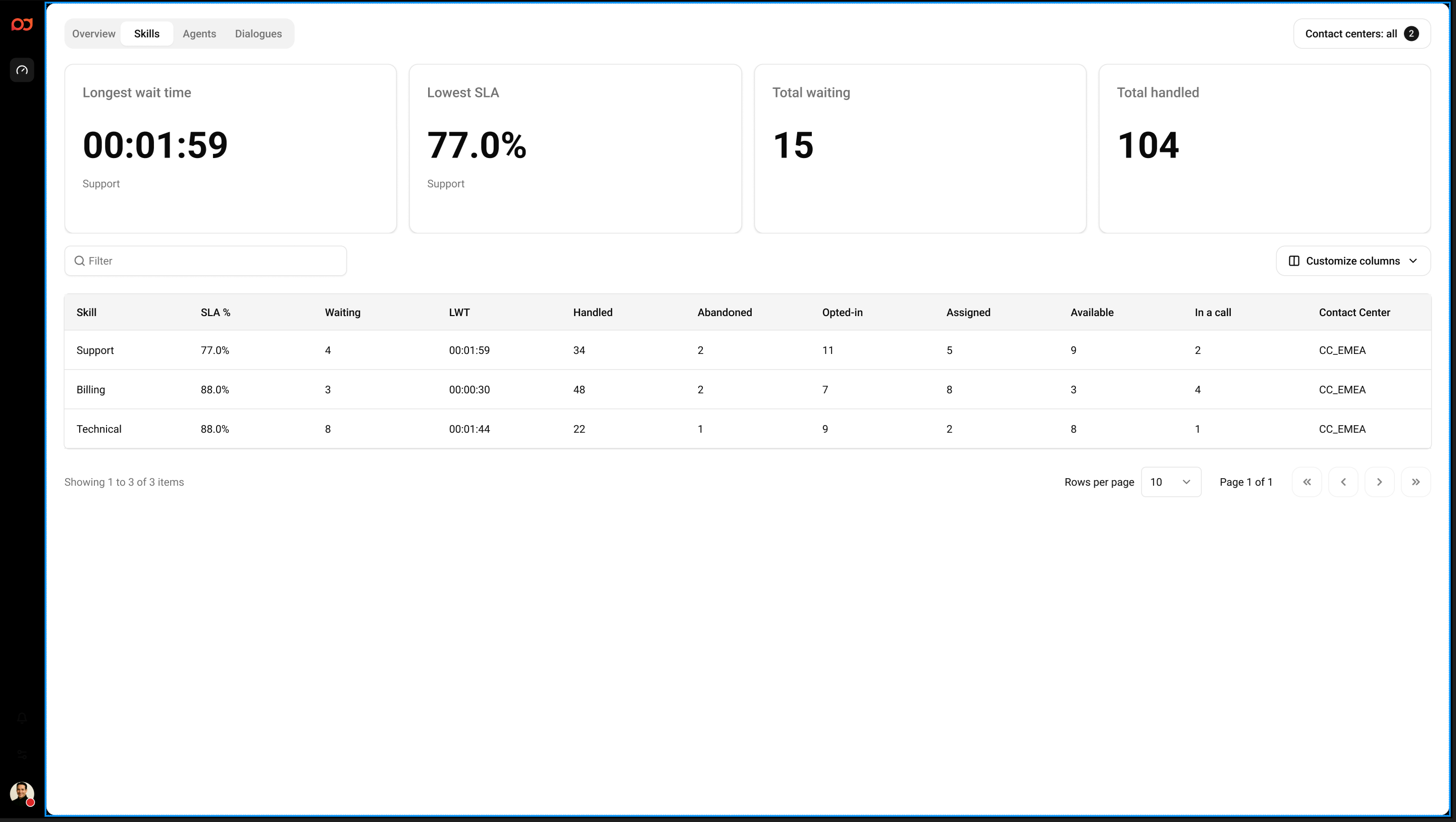
Summary cards
-
Longest wait time – The highest current wait time, including the skill where it occurs.
-
Lowest SLA – The lowest current SLA percentage, including the skill where it occurs. The SLA formula is:
(Total accepted dialogues answered within 20 seconds) / (Total accepted dialogues + Total abandoned dialogues) today -
Total waiting – Total number of contacts currently waiting across the selected contact centers.
-
Total handled – Total number of handled contacts in the current view.
Skill table
The table lists skills and the most important real-time operational metrics. Use the Filter field above the table to quickly find a skill.
Select Customize columns to show or hide columns based on what you want to monitor.
Columns
-
Skill – Skill name.
-
SLA % – Current service level percentage for the skill. The SLA formula is:
(Total accepted dialogues answered within 20 seconds) / (Total accepted dialogues + Total abandoned dialogues) today -
Waiting – Number of contacts currently waiting for this skill.
-
LWT – Longest waiting time for this skill.
-
Handled – Number of contacts handled in the current view.
-
Abandoned – Number of contacts abandoned in the current view.
-
Opted-in – Number of agents opted in to handle this skill (if applicable in your setup).
-
Assigned – Number of agents assigned to this skill (if applicable in your setup).
-
Available – Number of agents currently available for this skill.
-
In a call – Number of agents currently in a call for this skill.
-
Contact center – Contact center associated with the skill/row.
Tips
-
Sort by Waiting or LWT to spot emerging queue issues quickly.
-
If SLA drops for a skill, check agent coverage (for example, Available and In a call) and coordinate staffing accordingly.