Dialogue Workspace
Introduced in DC2025.02a - Arnhem (Dialogue Cloud Neo)
Dialogue Workspace is a real-time Agent/Supervisor view designed to help you monitor contact center activity, identify operational issues quickly, and take action with confidence.
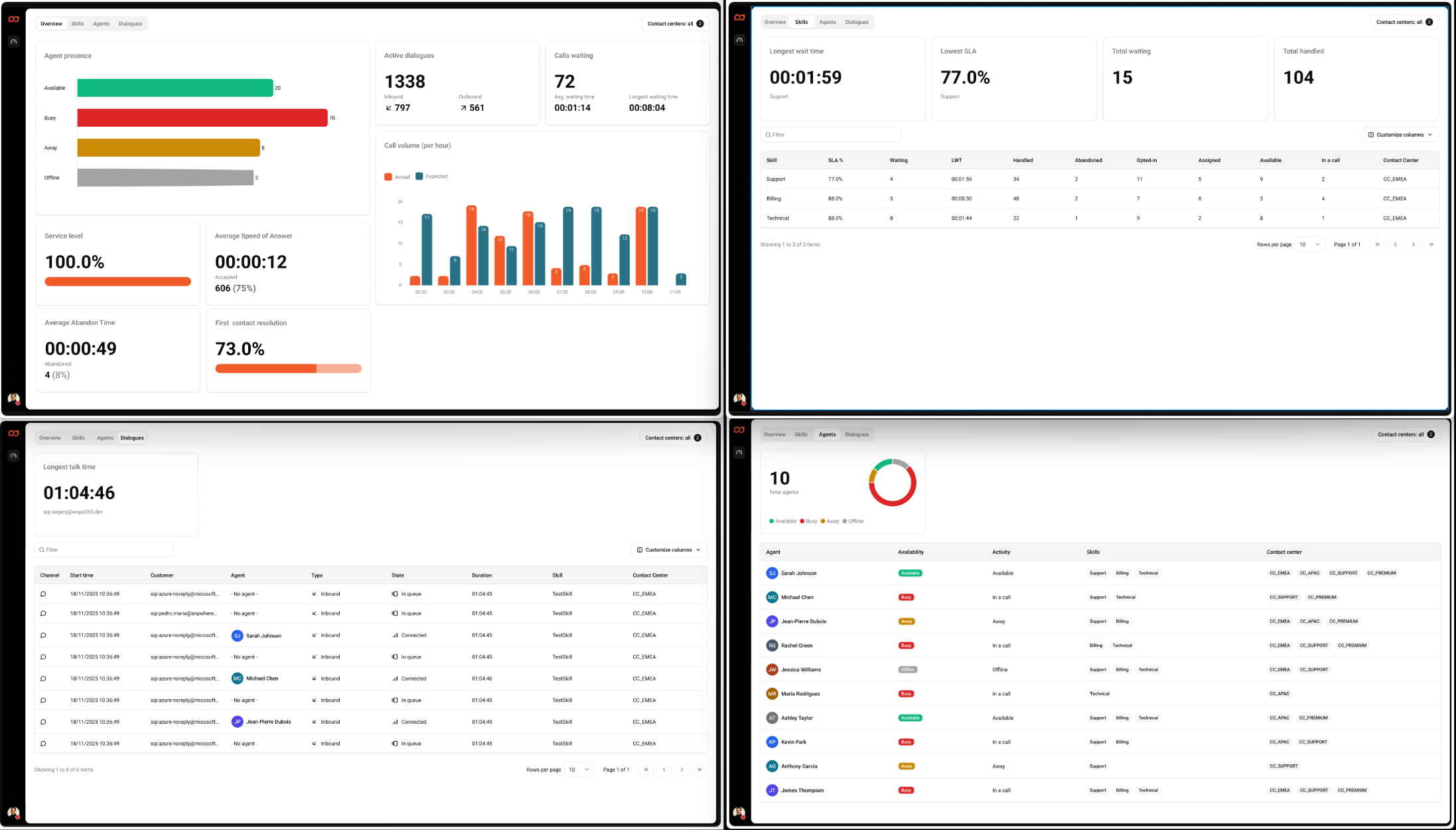
Dialogue Workspace uses the same underlying real-time data as Dialogue Insights, but presents it in a layout optimized for day-to-day supervision.
Access Dialogue Workspace
Open the regional URL for your tenant:
-
EMEA: https://app.emea.anywhere.now/dialoguecloud/dashboard/overview
-
APAC: https://app.apac.anywhere.now/dialoguecloud/dashboard/overview
-
NORA: https://app.nora.anywhere.now/dialoguecloud/dashboard/overview
Dashboards
-
Dialogue Workspace - Overview — A real-time snapshot of performance, queue conditions, agent presence, and call volume trends.
-
Workspace - Skills — Monitor queue health per skill, including SLA, waiting, longest wait time, and coverage.
-
Dialogue Workspace - Agents — See which agents are available, busy, or offline, and which skills they can handle. Select an agent to open the details panel (and monitor an active call when available).
-
Dialogue Workspace - Dialogues — Track active and recent dialogues, including state, duration, and assigned agent. Select a dialogue to open the details panel (and monitor an active call when available).
How to work in Workspace
-
Use the Contact centers selector (top-right) to switch between a single contact center or All contact centers.
-
Use the Filter field above tables to quickly locate a skill, agent, or dialogue.
-
Select Customize columns to tailor tables to your operational needs.
-
Select a row in Agents or Dialogues to open the details panel. If the selected agent/dialogue has an active call and you have the required permissions, you can use Monitor.
-
Start on Overview to spot issues, then drill into Skills, Agents, or Dialogues to investigate and respond.
For step-by-step instructions, see Dialogue Workspace User Guide.