Routing node - IVR Menu

Introduction
|
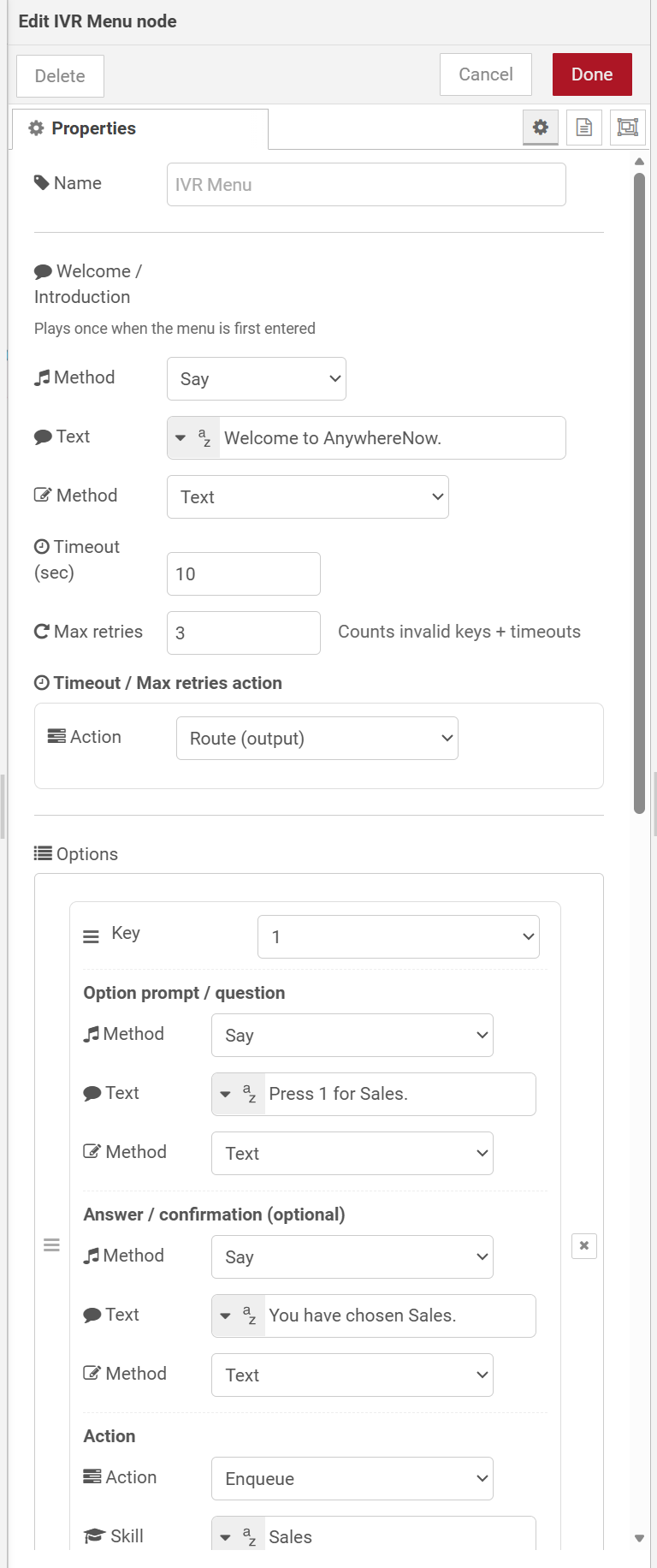
The Interactive Voice Response, or IVR, is a telephone application to take orders via telephone keypad or voice through a computer. By choosing menu options the caller receives information, without the intervention of a human operator, or will be forwarded to the appropriate Agent. Menu node provides a flexible Interactive Voice Response, or IVR, is a telephone application to take orders via telephone keypad or voice through a computer. By choosing menu options the caller receives information, without the intervention of a human operator, or will be forwarded to the appropriate Agent. menu. It plays a welcome prompt, listens for a single DTMF keypress (0–9, * or #), and then either executes a configured action or routes the session to a dedicated output port. Invalid keypresses and timeouts are automatically retried up to a configurable limit. |
Note
The IVR Menu node should be used in the incoming phase of a Dialogue Studio flow.
How it works
When a message arrives the node follows this sequence:
- The welcome / introduction prompt plays once.
- Each option's question prompt plays in list order.
- The node opens a DTMF listener and waits up to the configured Timeout seconds.
- When a valid key is pressed, an optional answer / confirmation prompt plays, then the configured action is executed.
- If the key is unrecognised or the timeout elapses, the node retries by re-playing the option prompts (the welcome prompt is skipped on retries). After reaching Max retries, the session is handled by the Timeout / Max retries action.
Note
The combined count of invalid keypresses and timeouts is used against the Max retries limit.
Configuration
| Setting | Description |
|---|---|
| Welcome / Introduction |
An optional prompt played once when the menu is first entered. Choose the delivery method:
|
| Timeout (sec) | How many seconds to wait for DTMF input after the option prompts have finished playing. Defaults to 10 seconds. |
| Max retries | Maximum number of failed attempts (invalid keypresses plus timeouts combined) before the session exits via the Timeout / Max retries action. Set to 0 to disable the limit. Defaults to 3. |
| Timeout / Max retries action | The action taken when the retry limit is reached. Supports the same set of actions as individual options (see Option actions below). Defaults to Route (output), creating a dedicated timeout output port. |
| Options |
The list of DTMF key options. Each option has three parts:
Options can be reordered with the drag handles. The order affects both the sequence in which question prompts are played and the numbering of Route output ports. |
Option actions
Available actions depend on the installed version. Some versions remove IVR Question and map the former None action to Empty. Check the actions shown in your editor before configuring an option or the Timeout / Max retries handler.
SharePoint IVR applicability
SharePoint IVR and reuse of its questions apply to Dialogue Cloud Neo (Connect). Reuse an IVR question only within the same A Unified Contact Center, or UCC, is a queue of interactions (voice, email, IM, etc.) that are handled by Agents. Each UCC has its own settings, IVR menus and Agents. Agents can belong to one or several UCCs and can have multiple skills (competencies). A UCC can be visualized as a contact center “micro service”. Customers can utilize one UCC (e.g. a global helpdesk), a few UCC’s (e.g. for each department or regional office) or hundreds of UCC’s (e.g. for each bed at a hospital). They are interconnected and can all be managed from one central location..
SharePoint IVR and the IVR Question option in Action, Incoming Call, and IVR Menu nodes are not available for Dialogue Cloud Neo (Unify) in the documented DC2025.02a scope. They are marked as planned in Dialogue Cloud Neo (Unify) Feature Availability.
This restriction does not apply to native Dialogue Studio prompts and keypad menus. Available editor actions depend on the installed version.
| Action | Description |
|---|---|
| None | No action is taken. The Node-RED message lifecycle completes without sending the session anywhere. |
| Route (output) | Creates a dedicated output port on the node. The incoming message is forwarded unchanged to that port, allowing downstream nodes to handle the session. |
| Disconnect | Ends the call immediately. |
| Enqueue | Places the caller in the queue for a configured skill. |
| CallBack, an IVR menu feature for voice, enables the customer to confirm or leave an alternative phone number to be called back by an available agent during business hours. | Offers the caller a callback for a configured skill. |
| Forward | Forwards the session to a The Session Initiation Protocol, or SIP, is a protocol for multimedia communication (audio, video and data communication). SIP is also used for Voice over IP (VoIP). SIP has interactions with other Internet protocols such as HTTP and SMTP. URI. |
| Preferred hunt | Routes the session to a preferred agent using a comma-separated list of SIP addresses and a fallback skill. |
| Queued callback | Places the caller in a queued callback for a configured skill. |
| IVR question | Where the installed version offers this action, connects the session to a named IVR question within the same UCC. Applies to Dialogue Cloud Neo (Connect); not available for Dialogue Cloud Neo (Unify) in the documented DC2025.02a scope. |
| Voicemail | Directs the session to voicemail for a configured skill. |
| Merge conversations | Merges the current session with another session that is waiting in queue, identified by session ID. |
Output
The node creates one output port per option configured with action type Route (output), plus one additional port for the Timeout / Max retries action when that is also set to Route. Ports are ordered to match the top-to-bottom order of the Route options in the list, with the timeout port last.
Note
Changing an option's action from Route to a direct action (or vice versa) will add or remove output ports and may remap existing wires. Review downstream connections after saving such changes.