Announcement
DC2025.02a will be made available in Phased Roll-out from June 24th, 2026, with an expected General Availability (GA) no sooner than July 21st, 2026.
Update 05-08-2026: The DC2025.02a update now also enables Dialogue Workspace for Dialogue Cloud Neo (Connect) customer environments. Customers who already ran the DC2025.02a update for Dialogue Cloud Neo (Connect) must run the update again to enable Dialogue Workspace.
Introduction
This release marks the first public deployment of Dialogue Cloud Neo (Unify), in addition to Dialogue Cloud Neo (Connect) an update to our earlier bundle A bundle is a fixed combination of our software platform elements of very specific versions. These are designed and tested to optimally work together to assure their intended function and interoperability. releases.
 Dialogue Cloud Neo (Connect)
Dialogue Cloud Neo (Connect) uses Microsoft Direct Routing to deliver PSTN calls to Dialogue Cloud.
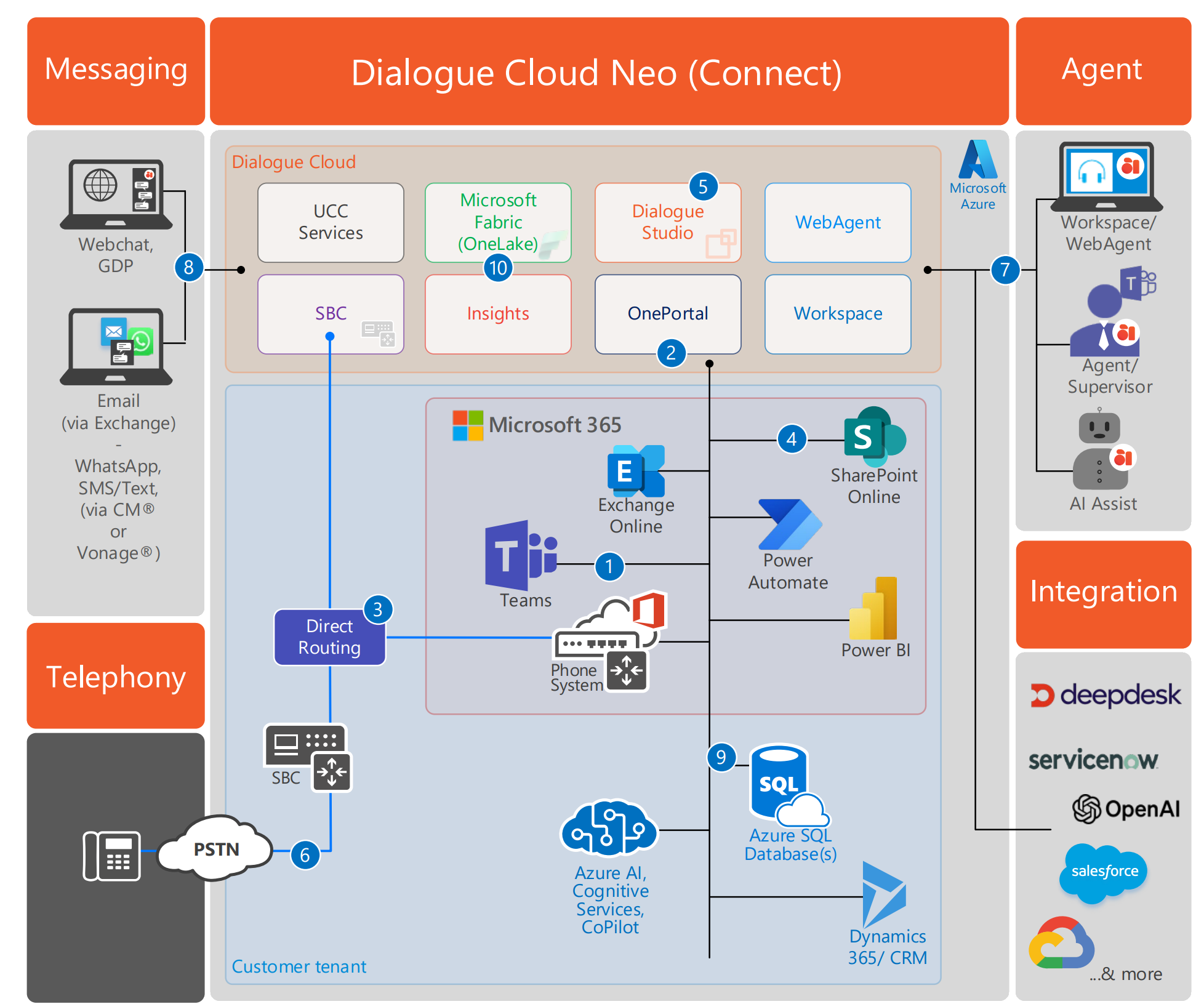
Calls enter via Teams Phone System, traverse the customer Session Border Controller (SBC), and route to the Dialogue Cloud SBC. Dialogue Cloud Neo controls routing, queuing, and dialogue management. Agents handle voice calls on their Teams client, with WebAgent providing queue visibility and call controls. Text channels (WebChat, email, SMS, WhatsApp) are handled through WebAgent.
Dialogue Cloud Neo (Unify)
Dialogue Cloud Neo (Unify) uses Azure Communication Services (ACS ACS commonly known as the acronym for Azure Communication Services, Microsoft's multichannel communication API in Azure for voice, video, chat, text messaging/SMS, email, and more to applications. Not te be confused with Azure Access Control Services (AACS) a deprecating authentication service of Microsoft, also sometimes abbreviated to ACS.) to deliver PSTN calls to Dialogue Cloud.
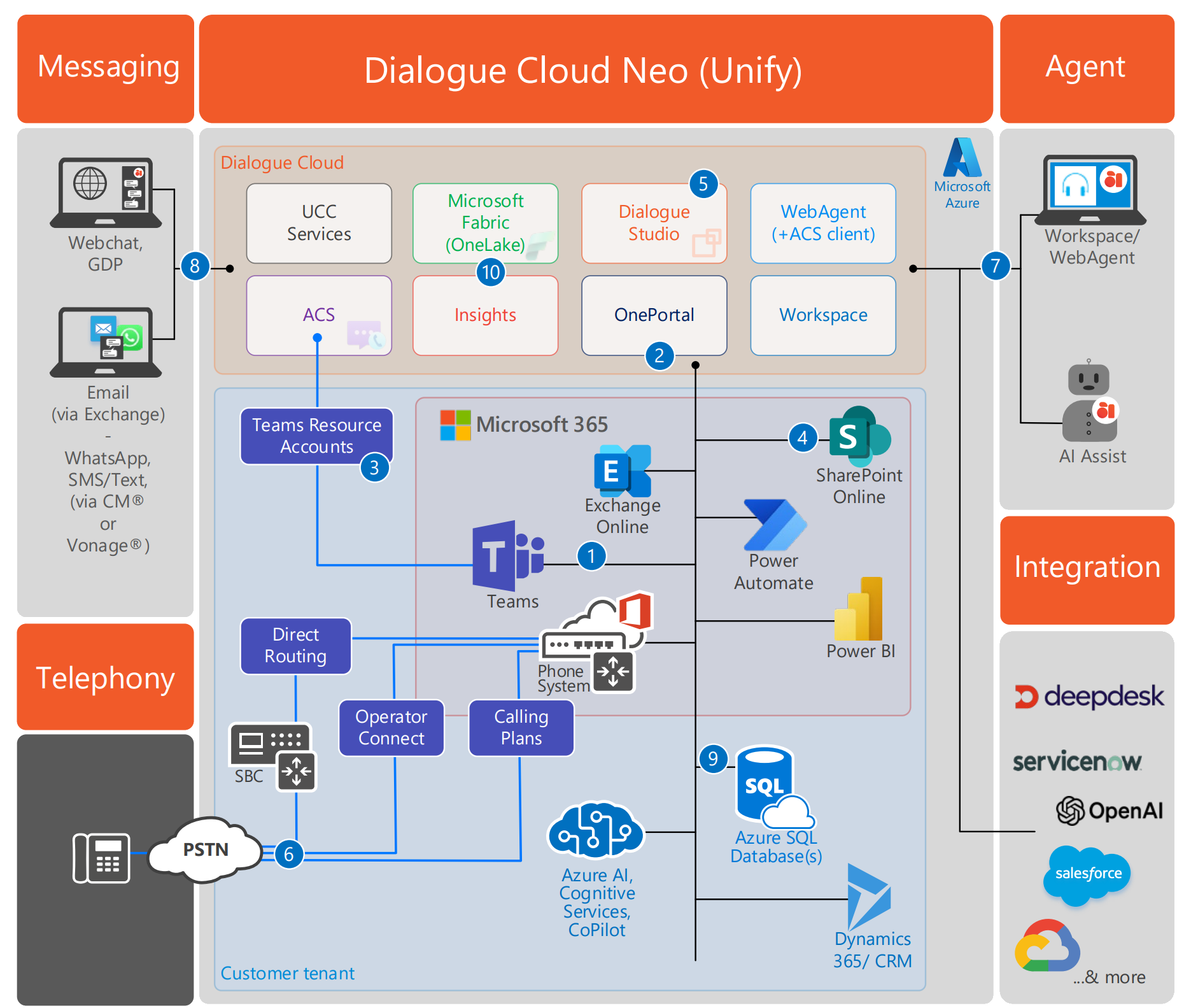
Calls enter via Teams Phone System, routed through Teams Resource Accounts linked to ACS. ACS extends calls to Dialogue Cloud Neo for routing and dialogue management. Agents handle voice calls on WebAgent with ACS client — the Teams client is not used for voice call handling.
Text channels are the same as the Connect model.
Alongside voice, this release delivers the first production versions of Dialogue Insights and Dialogue Workspace for Unify and Connect deployments.
The Data Processing Agreement (DPA) in our terms and conditions has been updated for Dialogue Insights. Review the current terms and conditions on our company website: Terms and Conditions.
For a feature-level overview of what Dialogue Cloud Neo introduces, see DC2025.02a.
Client Components
For existing customers on Dialogue Cloud Neo (Connect):
| Power BI template (for Power BI Desktop) |
8.10.251202.01 |
(Minimum required version for this bundle) |
| Inflight Wallboard (desktop client) |
6.5.8 |
|
| Snapper (desktop client) |
8.8.4 |
(Minimum required version for this bundle) |
Important
When upgrading from an older bundle, be sure to check out the What's New page for a concise list of all new features, behavioral changes and important updates you need to consider or execute, before upgrading!
Special mention-related settings changes
Important - Microsoft Graph Presence authentication requirement
Before updating to bundle DC2025.02a, change the Microsoft Graph Presence Source authentication method to ClientIdSecret. If the Microsoft Graph Presence Source still uses delegated username and password authentication, the Deployment Update will be rejected.
For configuration steps, see Microsoft Graph Presence Source (Get) Configuration.
Important - WebAgent history after the update
This change affects the history shown in WebAgent, including Call History, Timeline, Previous Contacts, and Frequent Transfers.
Dialogue Cloud Neo customers use Dialogue Insights for WebAgent history. Dialogue Insights starts gathering data after the DC2025.02a bundle update, so history becomes available from that point onward.
Important - WebAgent iframe plugin conversation ID after the update
The <conversationId> value exposed to the WebAgent iframe plugin now uses the platform dialogue or call ID (correlationId) instead of the previous hunting conversation ID (conversationId).
Before updating to DC2025.02a or higher, change existing iframe plugin configurations that use <conversationId> as a lookup key to use the <correlationId> placeholder instead. The <correlationId> placeholder is available from DC2025.01.
Important - custom CRM Customer Relationship Management, or CRM, is (usually) a software-based, data management method to deal with interactions with customers and potential customers. Service conversation ID after the update
This change only affects customers who use a custom CRM Service created with Dialogue Studio and use the WebAgent conversation ID as a lookup key for CRM records. For these customers, existing CRM lookups stop matching the expected record after the update because the conversationId URL parameter still has the same name, but contains a different ID value.
How to prepare
Before updating to DC2025.02a or higher, prepare affected custom CRM Service flows to handle both ID formats. Before the update, the value in the conversationId URL parameter is the hunting conversation ID: a 32-character value without hyphens, for example 769573355b8648528fc84966e7dbbf38. After the update, the same conversationId URL parameter contains the dialogue ID, also known as the correlation ID: a hyphenated GUID GUID stands for Globally Unique Identifier (format is always like 2ed153b4-f632-4766-b846-5b2a769b36d1) and is a pseudo random number used in software applications that is assumed to be unique. The total number of unique keys (2<sup>128</sup> of 3.4028×10<sup>38</sup>) is very large and the probability of the creating the same GUID twice is very small, though not 100% guaranteed. The term GUID is generally used by developers working with Microsoft technologies, while UUID is used everywhere else., for example 473872c0-a716-40b6-a5b2-75de47c96820. These IDs are different values and cannot be converted into each other.
Before the update, the URL can look like this: https://<webagent-service-url>/WebAgentService/api/v2/contact?ucc=<ucc-id>&q=tel%3A%2B<phone-number>&conversationId=769573355b8648528fc84966e7dbbf38
After the update, the URL parameter is still conversationId, but the value can look like this: https://<webagent-service-url>/WebAgentService/api/v2/contact?ucc=<ucc-id>&q=tel%3A%2B<phone-number>&conversationId=473872c0-a716-40b6-a5b2-75de47c96820
If your flow uses the WebAgent conversationId for a CRM lookup, add a Function or Switch node before the lookup to detect the ID format and route the flow to the correct lookup behavior. Use ^[0-9a-fA-F]{32}$ for the pre-update format and ^[0-9a-fA-F]{8}-[0-9a-fA-F]{4}-[0-9a-fA-F]{4}-[0-9a-fA-F]{4}-[0-9a-fA-F]{12}$ for the post-update GUID format. Route unexpected formats to your flow's error handling instead of performing the CRM lookup with an invalid key.
During the transition, make sure the CRM endpoint or lookup logic accepts both the old and new conversationId value formats, or use another stable customer key for the lookup and store the current conversationId only for traceability. If records created before the update only contain the old conversationId value, treat post-update GUID values as a new identifier namespace instead of assuming that the legacy lookup will match.
New features
| PBI | Description |
|---|---|
| 135175, 135229 |
Teams Calling Support now inside WebAgent (ACS). With the contact center connected via ACS on Unify, the WebAgent now supports embedded Teams calling capabilities. The Microsoft ACS web-client allows agents to make and handle calls directly within the WebAgent interface. This brings unified call control to the WebAgent, delivering a seamless calling experience without even requiring a separate Teams client active. |
| 135010 |
Dialogue Insights Reporting in OnePortal Formerly known as Partner Portal. A redesigned web portal for managing Dialogue Cloud deployments. We have introduced the new Dialogue Insights reporting experience in OnePortal, providing customers with both real-time and historical insights through integrated dashboards. These dashboards are directly accessible and embedded within the portal, offering a more seamless and centralized way to monitor operational performance, but can also be distributed to end-users as shareable URL's. See: Dialogue Insights |
| 138098, 138092, 138088, 138085 |
Dialogue Workspace We have introduced Dialogue Workspace, providing supervisors and contact center operations leaders with real-time operational dashboards for queue status, agent availability, active interactions, and service performance in a single interface. In DC2025.02a, Dialogue Workspace is available for Dialogue Cloud Neo customer environments. New customer updates to Dialogue Cloud Neo (Connect) now also enable Dialogue Workspace. Dialogue Cloud Neo (Connect) customers who already ran the DC2025.02a update must run the update again to enable Dialogue Workspace. In DC2025.02a, Dialogue Workspace operates alongside WebAgent for call handling and is the real-time complement to Dialogue Insights. See: Dialogue Workspace |
| 142113 |
WebAgent can show real-time transcription of a call (excl. transfer) We have introduced an improved voice transcription panel experience in WebAgent, providing agents with clearer, more accessible live transcription during conversations. This enhancement helps streamline interactions and supports more efficient communication handling. |
| 150680 |
Dialogue Studio — Business Hours Node A new Business Hours node is now available in Dialogue Studio, allowing flow authors to define and manage in-hours and out-of-hours routing directly within their call flows. This provides a flexible, timezone-aware alternative to the Business Hours configuration in the SharePoint UCC interface, simplifying setup and improving maintainability. See: Business Hours |
| 150654 |
Dialogue Studio — Holidays Node We’ve introduced a new Holidays node in Dialogue Studio that enables routing based on public holidays or custom date ranges with timezone-aware logic. This new capability can be used instead of the Holiday list items in the SharePoint UCC configuration interface, simplifying setup and reducing the need for manual date-based configuration. See: Holidays |
| 150682 |
Dialogue Studio — New IVR Interactive Voice Response, or IVR, is a telephone application to take orders via telephone keypad or voice through a computer. By choosing menu options the caller receives information, without the intervention of a human operator, or will be forwarded to the appropriate Agent. Menu Node A new IVR Menu node is now available in Dialogue Studio, allowing you to design interactive voice menus directly within your conversation flows without relying on IVR Questions and DTMF choices configured in the SharePoint UCC interface, or building the IVR questions and actions with multiple individual nodes in Dialogue Studio. This simplifies IVR configuration and centralizes menu logic, making it easier to build and maintain flexible call experiences in Dialogue Studio. See: IVR Menu |
| 143946 |
Dialogue Studio - Set Priority Node A new Set Priority node is now available in Dialogue Studio, allowing flow authors to assign a priority level from 0 to 3 to the current dialogue directly within the flow. This makes it easier to influence routing behavior for supported Unify sessions without relying on external configuration or custom handling. See: Set Priority |
| 144699 |
Dialogue Studio — Dialogue AI Assist Nodes We have added new Dialogue AI Assist nodes to Dialogue Studio, making it easier to connect voice-dialogue events and transcript streams to Dialogue AI Assist. These nodes support scenarios such as sending agent join and leave events, starting transcript processing, and forwarding transcript data for downstream AI-assisted analysis and automation. |
| 144033 |
Dialogue Studio — AI Nodes We have added a new family of AI nodes to Dialogue Studio, enabling flows to enrich, classify, summarize, generate, and route interactions by invoking Azure OpenAI services. This rollout also introduces the related configuration support needed for these nodes, including CC Settings for AI-driven routing scenarios such as AI Pathfinder. See: AI Nodes |
| 130194 |
Expanded Voice Connectivity via Azure Communication Services (ACS) We have expanded Dialogue Cloud’s voice capabilities by adding support for Microsoft Azure Communication Services (ACS), also known as the Teams Phone extensibility or “Unify” connectivity model. This enhancement allows enterprises to connect Dialogue Cloud directly to their existing Microsoft Teams voice ecosystem and extend advanced contact center functionality on top of Teams Phone. Customers can now use Dialogue Cloud with Teams voice environments configured through Microsoft Calling Plans, Operator Connect, or Direct Routing (Connect), significantly increasing deployment flexibility compared to previous models. By leveraging ACS as the underlying connectivity layer, Dialogue Cloud integrates more deeply with Microsoft’s native voice platform, enabling a more streamlined architecture and consistent calling experience. |
| 137611 |
Call Recording Available for Dialogue Cloud on Unify (ACS) Call recording is made available for Dialogue Cloud on Unify, delivering the same recording experience previously offered on Dialogue Cloud for Direct Routing (V3). While recordings are handled via the Microsoft Azure Communication Services backend, recorded calls are still stored in the familiar UCC SharePoint Recording library, ensuring continuity for compliance and review workflows. Note By default MS Teams plays a call recording notification which currently can only be disabled via a request to MS as documented here: Why is my end user hearing an announcement that I didn't trigger whenever I start or pause the call recording? |
| 141967 |
Multi-Persona Support in the UCC We have improved UCC support for multi-persona agent scenarios so that agents signed in to WebAgent are hunted only in that application and no longer simultaneously hunted in Microsoft Teams client. This helps provide clearer call delivery behavior for agents and supports certification requirements for the WebAgent experience. |
| 135857 |
Dialogue Classification Events We have introduced Dialogue Classification events that are emitted whenever an agent adds, updates, or removes a dialogue classification. This makes the latest classification available for downstream reporting and analytics, helping contact center managers understand why customers are getting in touch and identify trends more effectively. |
Feature enhancements
| PBI | Description |
|---|---|
| 143504 |
AnywhereNow Product Name Updates Reflected in all WebAgent UI's We have updated WebAgent to correctly display the latest product naming across the user interface. All relevant labels, headers, and branding elements now consistently reflect the new product names as intended. This ensures a clearer and more aligned experience with current product branding. |
| 123496 |
Improved Accessibility: Focus Not Obscured in WebAgent We fixed an issue where focused elements could be partially hidden during navigation, ensuring they are always fully visible on screen. This update improves accessibility compliance and delivers a smoother, more reliable experience for keyboard users. |
| 123502 |
Improved Keyboard Focus Visibility in WebAgent We have improved the visibility and consistency of focus indicators across WebAgent to better support keyboard navigation and align with WCAG 2.2 accessibility guidelines. This ensures users can more easily track their position when navigating without a mouse, resulting in a more accessible and user-friendly experience. |
| 109800, 109945 |
Improved protection against accidental WebAgent closure Agents are now prompted with a browser confirmation dialog when attempting to close or refresh the WebAgent tab while active conversations are still ongoing, helping prevent accidental call disconnections. This update restores expected behavior following changes in modern browsers that could disrupt this safeguard. |
| 151057 |
Improved Call Transfer Reliability for Job Title and Department Searches We have resolved an issue where call transfers could fail when selecting a contact directly from search results based on job title or department in WebAgent. Transfers now proceed successfully without requiring users to expand the contact and manually select a phone number, ensuring a smoother and more intuitive call handling experience. |
| 151614 |
Dialogue Studio: AnywhereNow Branding Alignment and UX Enhancements Dialogue Studio has been updated to align with AnywhereNow’s latest branding, with all relevant user-facing elements now consistently reflecting “Dialogue Cloud” and “Dialogue AI Assist” terminology. This update also introduces improved clarity in node naming—particularly for text-based sessions—along with performance improvements that deliver a faster and more consistent editor experience. Customers will also benefit from a refreshed visual design, including a new color palette and more descriptive node labels and help texts that enhance usability and simplify flow creation. |
| 134668 |
Dialogue Events Now Include Channel Information We have added channel information to dialogue events for text-based sessions, making it possible to distinguish channels such as SMS, WhatsApp, and other custom session types more clearly. This improves downstream integrations, event handling, and reporting by exposing the session channel as metadata instead of treating all text conversations as a single generic type. |
| 139995 |
Improved Naming for the Copilot Studio Node and Configurations We have improved the naming behavior for the Dialogue Studio Copilot Studio node and its related configuration entries. The node now uses the correct default name when added to the editor, and configuration items can now be individually named more clearly, making them easier to identify and manage in flows with multiple Copilot Studio setups. |
| 137243 |
UCC Event Bus Events Now Include the Service Name We have added the |
| 134106 |
Improved Correlation Between ACS Call IDs and Event Bus Dialogue IDs We have improved event correlation for Dialogue Cloud on Unify by using the Azure Communication Services (ACS) call correlation ID as the session Dialogue ID. This makes it easier for frontend components, integrations, and reporting solutions to relate UCC dialogue events to the corresponding ACS call and maintain consistent end-to-end tracing. |
Resolved issues
| PBI | Description |
|---|---|
| 145606, 143676 |
Improved Performance and Handling of Unfinished Dialogues in WebAgent We have improved WebAgent performance by preventing large numbers of unfinished conversations from impacting responsiveness, ensuring a smoother experience during intensive usage. Disconnected dialogues are no longer kept in memory and are instead retrieved from backend services when needed, such as after a browser refresh or login. Historic conversations remain available for follow-up actions for up to 24 hours, after which they are automatically no longer retrievable. |
| 152036, 152039, 152040, 152061, 151862 |
Improved Timeline Call History Performance in WebAgent We have improved how WebAgent retrieves Timeline call history. Agents can now switch more reliably between incoming and outgoing Timeline tabs, even when many history records are available, without running into 504 Gateway timeout errors. Timeline history is also retrieved more efficiently for agents who work in multiple UCCs, including UCCs that use different CDR Call Detail Records (CDR) are the meta data of a converstation: who talked to whom, at which time, for how long and with which identity among other things (skill, optional classification, etc) which gets stored in your SQL (analytical) database. backends. |
| 134649, 134726 |
Improved Keyboard Accessibility in Wrap-Up Dialog We have enhanced keyboard accessibility in the WebAgent wrap-up dialog, ensuring that elements within nested layouts can now be properly focused and navigated using the Tab key. This WCAG-aligned improvement enables agents to complete wrap-up actions more efficiently without relying on a mouse. |
| 135647, 138682 |
Improved Participant Name Display in WebAgent Consults WebAgent now retrieves and displays participant display names during consult and conference scenarios, even when they are not initially available. This ensures agents consistently see recognizable names instead of technical identifiers, improving clarity when managing multiple participants in a conversation. |
| 134531, 134763 |
Improved Supervisor Call Handling Across Mixed CRM Configurations We have improved call handling for supervisors working across multiple UCCs with different CRM configurations. When at least one assigned UCC has CRM enabled, actions performed on calls in UCCs without CRM integration no longer trigger unnecessary CRM lookups, preventing errors and ensuring a clean user experience. |
| 134856 |
Improved Keyboard Accessibility for Call Classifications Modal. We have resolved an issue where the call classifications modal could become unresponsive when navigating with the Tab key after closing a conversation. The modal now supports reliable keyboard navigation, delivering a cleaner and more accessible experience in line with WCAG guidelines. |
| 136810, 137068, 137486 |
WebAgent – Improved Keyboard Navigation Experience We have enhanced keyboard navigation across WebAgent to ensure all interface elements can be reached and controlled consistently using standard keyboard actions. Users can now reliably move between conversations, tabs, and controls without navigation being blocked or skipped, providing a smoother and more accessible experience. |
| 136606, 137820 |
Improved Performance for Timeline Requests in WebAgent We have resolved an issue where unnecessary timeline requests could be triggered during active hunt scenarios in WebAgent. This improvement reduces redundant processing and helps ensure a smoother and more responsive user experience. Users should now experience more consistent performance when interacting with timelines during hunts. |
| 127878, 127939 |
Improved Caller Identification with Name Display We have resolved an issue where only the caller’s phone number was shown, even when the caller’s name was available. With this fix, the system now correctly displays the caller’s name alongside the number, providing clearer context for incoming interactions. This improvement helps agents identify callers more easily and deliver a more personalized experience. |
| 122856, 123876, 118138 |
Improved Call Control Cancelling Consultation and Transfer Scenarios Agents can now cancel consultation and transfer calls while the recipient is still ringing, helping prevent unintended or unnecessary connections. This enhancement ensures cleaner call control and immediate feedback when a cancel action is triggered, improving overall handling accuracy and efficiency. |
| 144862, 144775 |
Fix: Salesforce CTI Activity Not Logged When Using Multiple Tabs. We resolved an issue where Salesforce users working with multiple browser tabs were unable to register CTI activity because no tab was correctly designated as the primary service worker. With this fix, the first Web Agent session loaded now consistently becomes the primary tab, ensuring CTI events and task activities are logged as expected regardless of how tabs are opened. This improvement restores reliable multi‑tab behavior for agents who frequently operate with several Salesforce windows. |
| 151905 |
Improved Call Transfer Reliability Without Endpoint Selection We have improved the call transfer behavior in WebAgent to ensure transfers succeed even when no specific endpoint is selected. Transfers now default to the appropriate phone endpoint, resulting in a more reliable and seamless agent experience during call handling. |
| 122849 |
Enhanced Inbound Call State Reliability. We've implemented a significant improvement to the WebAgentService's handling of inbound call states, addressing a complex, race-condition-driven issue in the Core that occasionally prevented calls from being correctly marked as accepted. Previously, the system relied on a workaround involving `AgentDisplayName` and `AgentSipAddress` due to the unreliable setting of the `AcceptedSince` property. This update now prioritizes the `AcceptedSince` property to trigger state changes, while retaining the `AgentDisplayName` and `AgentSipAddress` combination as a robust fallback. This dual-condition approach drastically reduces the chance of misfires, ensuring more consistent and accurate inbound call acceptance and transfers, correct display of accepted calls in the frontend, and continued support for agents configured solely by phone number. |
| 126412 |
Improved Outbound Dialing Flexibility. We've further enhanced the WebAgent's outbound calling functionality to allow for a broader range of phone number formats. Previously, strict validation in the WebAgent prevented calls to numbers that were otherwise valid, resulting in "Uri is not a valid phone number" errors. This update loosens the WebAgent's phone number validation to align with the more flexible standards used by platforms like Microsoft Teams and Skype for Business. Validation will now primarily occur at the UCC level, ensuring more successful outbound calls while still maintaining necessary number integrity checks. |
| 127044, 129052, 129054 |
Calls can be transferred directly to voicemail from WebAgent. You can now transfer calls directly to another agent’s voicemail from WebAgent when that other agent is unavailable, or otherwise wanting to be directed to voicemail, enabling callers to reach the intended recipient without additional steps. Of course provided that voicemail is enabled on the underlying platform and for that agent. This improvement provides a smoother and more efficient call handling experience for agents working in WebAgent. |
| 147181 |
Improved Accuracy of DM AnywhereNow Dialogue Manager (DM) is the internal service which processes text based messages from various Dialogue Providers to and from WebAgent. It is a transactional database used to swiftly process messages rather than generate reports used by analytical databases. Queue Time in WebAgent. We have improved how elapsed queue time is calculated for text-based conversations in WebAgent, ensuring it remains accurate even after multiple service restarts. Previously, elapsed time could reset when queued dialogues were restored, leading to inconsistent wait time visibility, but it is now preserved to reflect the original time spent in queue. |
| 148284 |
WebChat Conversations No Longer Persist in Queue After Customer Exit We have resolved an issue where WebChat conversations remained visible in the connected queue after a customer had already left, which could lead to confusion and unintended requeue actions. Conversations are now correctly removed once the customer disconnects, ensuring a cleaner and more accurate queue experience for agents. |